hotty
HTML over the TTY. Programs put HTML on a terminal's screen, among its cells.
HTML over the TTY.
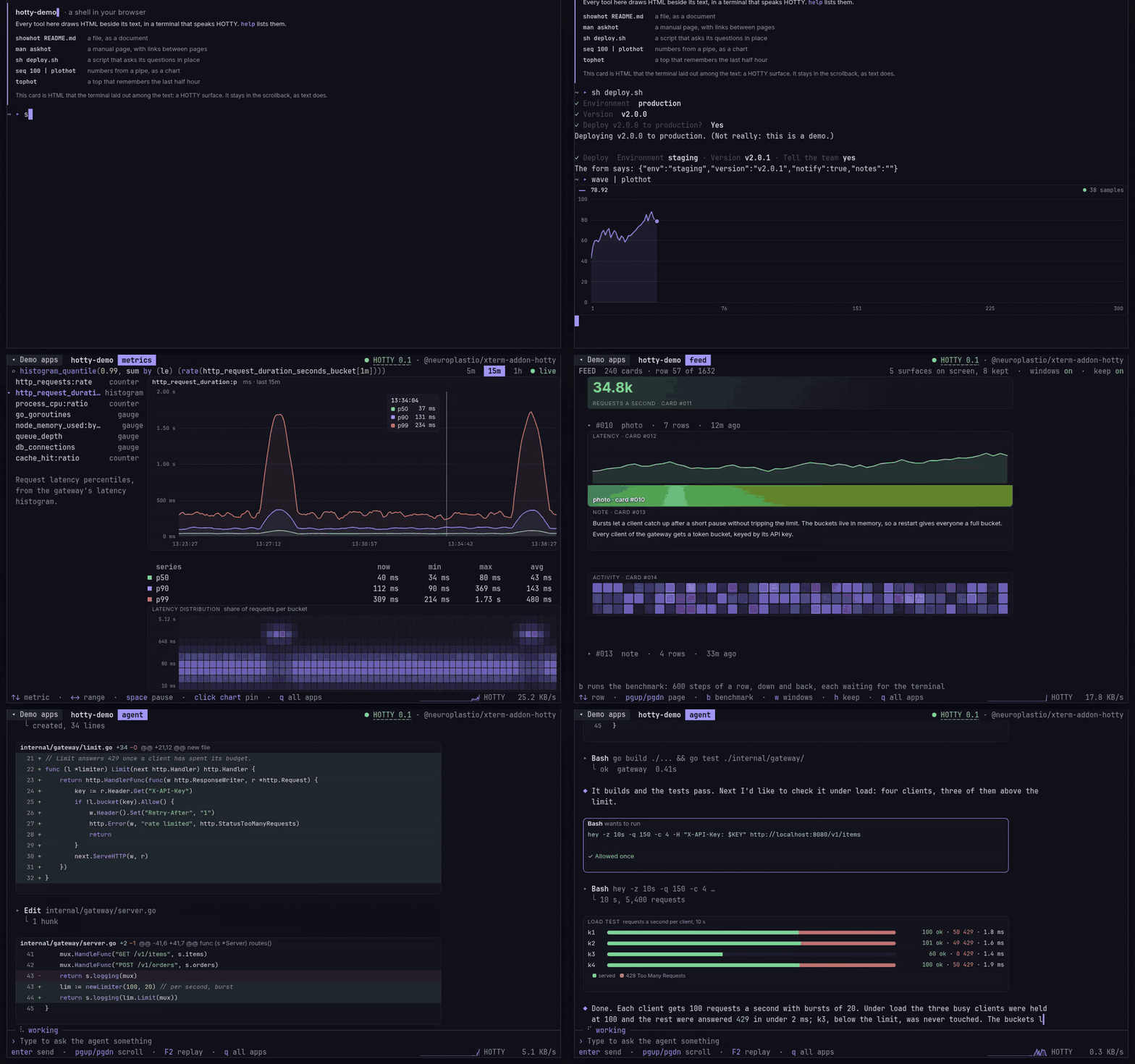
A terminal program prints small HTML documents — surfaces — and the terminal lays them out and draws them into rectangles of cells. No script, no network, no browser: everything travels in-band, so it works over a pty and SSH, and falls back to plain text where there is no host.
Website · Docs · Specification · Changes · Examples
Why hotty
A terminal program has cells: monospace characters with a few attributes. hotty adds a second kind of output: a surface, one HTML document placed on a rectangle of cells. The host lays it out and draws it at the terminal's own resolution: proportional type, tables, form controls, SVG, images. Outside it, everything stays a terminal. Clicks, changes and submits come back to the program as events on its input.
hotty is designed around four constraints:
- In-band. Everything a surface needs travels in the program's output stream. Nothing is loaded from files or the network, so a program behaves the same locally, over SSH and inside a container.
- The program is the application. Surfaces have no script. The program holds the state and decides what every event means; the terminal is the view.
- Deltas, not redraws. Updates are addressed by element id, so a change costs what it changes: a live number is tens of bytes.
- Degrade, never break. A program detects its host and falls back to plain cells where there is none.
How hotty works follows one surface from the program's first byte to the user's click.
Status
Version 0.4, a draft. Versions 0.x may change incompatibly (§15 of the
spec). 0.4 breaks 0.3: keys are named as myelin key names 0.1
names them (ctrl+a, arrow_left, mod+s), and a finger can drag in a
program's cells. CHANGES.md says what changed and how to
upgrade.
Two hosts that share no code pass the conformance vectors: hotty-blitz, the renderer inside hottyterm, and xterm-addon-hotty, for xterm.js in a browser.
Quick start
The quickest host is hottyterm, a terminal built on Ghostty with hotty built in:
brew install --cask neuroplastio/tap/hottyterm   # macOS on Apple silicon
yay -S hottyterm-bin                             # Arch Linux on x86_64
Then run an example in it:
python3 examples/dash.py
Nothing to install? hotty.neuroplast.io is a hotty program too: the tour, the demo apps and a toolkit of hotty tools, in a browser through xterm-addon-hotty or natively in hottyterm.
Where to go next
- To run hotty programs: Choose a host: hottyterm, a browser, any terminal with kitty graphics, or plx.
- To write one: Choose an SDK: Go, TypeScript, Lua, or the one-file Python client in this repository.
- To understand it: the Concepts, starting with How hotty works.
- To implement it: the protocol, the SDK design every SDK follows, and the conformance vectors.
Repositories
| repository | what |
|---|---|
hotty |
this one: the protocol, its conformance vectors, these docs and the reference client |
hotty-go |
the Go SDK: the protocol, hottytea for Bubble Tea, hottyterm for command-line tools, and hottytest, a host for tests |
hotty-ts |
the TypeScript SDK, for Node and Bun |
hotty-lua |
the Lua SDK: the wire layer, hotty.nvim for Neovim and hotty.plx for plx scripts |
hottyterm |
a terminal that speaks hotty natively: Ghostty with hotty-blitz built in, installed with Homebrew or the AUR |
hotty-blitz |
a renderer (Rust, on Blitz) with a C ABI for terminals, and hotty run, a polyfill that shows surfaces in any terminal with kitty graphics |
xterm-addon-hotty |
an xterm.js addon: the browser renders each surface in a sandboxed iframe |
| hotty.neuroplast.io | the website: the tour, the demo apps and the toolkit, as one terminal program (native and WebAssembly); its source is not public |
What is here
| path | what |
|---|---|
SPEC.md |
the protocol |
SDK.md |
what a library that speaks hotty for programs provides, in any language: its components, options, defaults and names |
CHANGES.md |
what each version changed, and how to upgrade to it |
docs/ |
these docs: choosing a host and an SDK, and the concepts |
conformance/ |
the conformance vectors: what a host and an SDK must do, as data |
corpus/ |
pages that exercise the HTML and CSS a surface is expected to handle |
examples/ |
programs that speak hotty: a card, a dashboard, a form, a large grid, a game, a menu |
clients/python/hotty.py |
a dependency-free reference client with SDK.md's whole wire layer, used by the examples and the hosts' tests; test_vectors.py runs the SDK vectors against it |
examples/bubbros.py needs the game first: scripts/bubbros-fetch.sh. Its art
is not ours to publish; it is replaced before anything built on it is.
Changing the protocol
- A change to the wire goes into
SPEC.mdandconformance/vectors.jsontogether, and both implementations run the new vectors. A change that breaks existing programs or hosts needs a new version (§15). - Extensions live in implementations under a vendor prefix (§15). They come here when a second implementation wants them.
Licence
SPEC.mdand the documentation: CC BY 4.0.- The vectors, corpus, examples and client: Apache-2.0.