hotty — HTML over the TTY
Version:  0.4
Status:   Draft. Versions 0.x may change incompatibly (§15).
Licence:  CC BY 4.0 (this document); the conformance vectors are
          Apache-2.0.
Abstract
hotty lets a program running in a terminal show surfaces: small HTML documents drawn by the terminal into rectangles of cells, the way the kitty graphics protocol places images. The program sends markup and deltas in-band, as escape sequences in its ordinary output, so it works over a pty, over SSH and through anything else that carries a terminal's bytes. The terminal lays the markup out, draws it, and handles focus, typing and hover itself. What the user does comes back to the program as events on its input.
There is no script and no network. The program is the application: it holds the state and decides what every event means. The terminal is the view. A surface can do nothing the program did not send it, and can learn nothing the program did not give it.
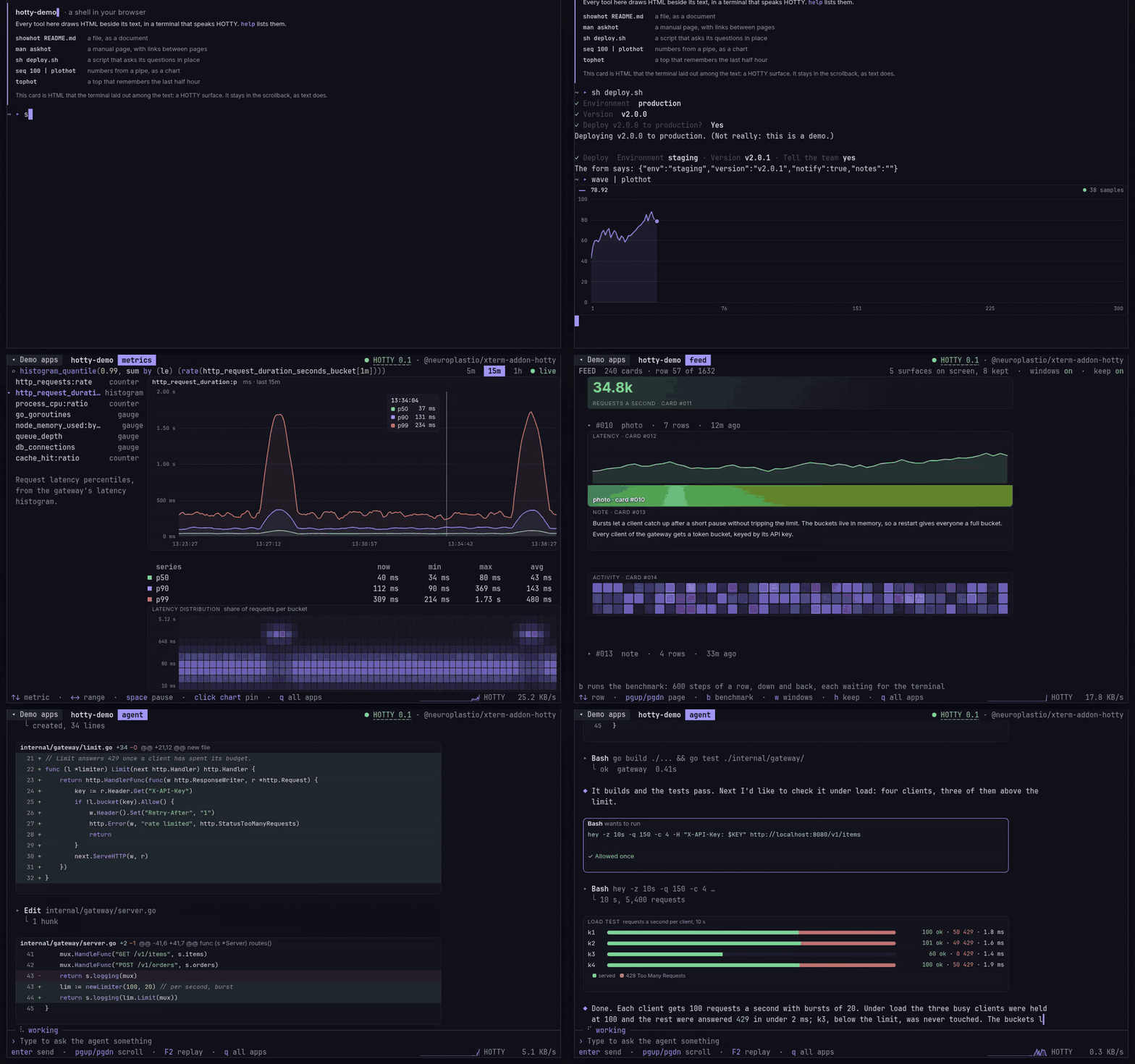
The hotty website, hotty.neuroplast.io, running in xterm.js with xterm-addon-hotty, one of the two hosts that share no code and pass the conformance vectors. Every surface — the askhot questions, the charts, the table, the diagram, the cards, the diff, the approval — is HTML the program sent in-band, in the terminal's own output; the cells around them are the program's too.
Contents
- Introduction
- Conventions
- The envelope
- Detection and capabilities
- Surfaces
- Deltas
- Resources
- The host stylesheet
- Events
- Keyboard and focus
- Text
- Security
- Limits
- Degradation
- Versioning and extensions
- Conformance
Appendices: A. Examples · B. Rationale · C. Prior art
1. Introduction
A terminal program has cells: monospace characters with a few attributes. hotty adds a second kind of output: a surface, one HTML document, placed on a rectangle of cells. Inside it the host lays out and draws the document at the terminal's own resolution, with proportional type, tables, form controls, SVG and images. Outside it, everything stays a terminal.
hotty is designed around four constraints:
- In-band. Everything a surface needs travels in the program's output stream. Nothing is loaded from files or the network, so a program behaves the same locally, over SSH and inside a container.
- The program is the application. Surfaces have no script. The program changes the document with deltas and hears about events. It never runs code in the terminal.
- Degradable. A program asks whether the terminal is a hotty host before using it, and paints ordinary text when it is not. Terminals that are not hosts ignore hotty sequences.
- Cheap to update. Changes are deltas addressed by element id, so a program changing one number sends a few bytes, and a host repaints what changed.
Non-goals
hotty is not a web browser in a terminal:
- it has no URLs to visit;
- it loads nothing remotely;
- it runs no JavaScript or WebAssembly;
- it has no cookies or storage.
It is also not a replacement for cell-based TUIs: surfaces sit beside terminal text, and a program can use both.
2. Conventions
The key words MUST, MUST NOT, SHOULD, SHOULD NOT and MAY are to be interpreted as described in RFC 2119 and RFC 8174 when, and only when, they appear in bold.
- Program: the process whose output the terminal displays.
- Host: whatever renders hotty for that program. Usually the terminal emulator itself. It can also be a pty shim between the program and a terminal (a polyfill; §14). A multiplexer between a program and a terminal either is a host itself, or passes hotty through and keeps placements consistent with its own screen and scrollback.
- Session: a program's connection to a host, from the first hotty command until a full reset or the end of the program's output.
- Surface, resource, delta, event: §5, §7, §6 and §9.
ESCis 0x1B,BEL0x07,STthe two bytesESC \.CSIisESC [.- CSS pixel: CSS's reference pixel. A host's scale is device pixels per CSS pixel.
3. The envelope
3.1 Sequences
Every hotty message, in both directions, is an operating system command:
ESC ] 7279 ; <control> [ ; <payload> ] ST
- 7279 is the ASCII codes of
HandO. - A host MUST also accept
BELas the terminator. Hosts sendST. - A terminal that is not a hotty host ignores the sequence, as it ignores any OSC it does not know. That is what makes hotty safe to try (§4).
3.2 Control
<control> is a list of key=value pairs separated by :.
control = pair *( ":" pair )
pair    = key "=" value
key     = ALPHA *( ALPHA / DIGIT / "-" / "_" )
value   = *( %x20-39 / %x3C / %x3E-7E )    ; printable ASCII except ":" ";" "="
- A key appears at most once.
- A host MUST ignore keys it does not know (§15).
- A value is printable ASCII. Whoever sends one, a host or a program,
MUST replace each character a value may not hold with
_::,;,=, a control character, and any character outside ASCII. It replaces each Unicode code point with one_, and each byte that is not UTF-8 with one_. An element whose id iscaféis reported ast=caf_, so a program that needs its ids back gives them in ASCII.
3.3 Payload
<payload> is the command's body, base64 encoded (RFC 4648, standard
alphabet).
- Hosts MUST accept base64 with or without padding, and ignore whitespace in it.
- A program MAY compress a body with zlib (RFC 1950) before encoding
it, and mark it
o=z. A host MUST NOT compress what it sends (replies and events), so a program needs no zlib to read them. - An empty body is sent as nothing, and the
;before it may then be omitted. - Text bodies (markup) are UTF-8.
- Bodies with fields are msgpack (MessagePack). The body of a reply (§3.6, §4) or an event (§9) is one msgpack map, with nothing after it, and so are a program's deltas (§6.1), touch areas (§9.6) and menus (§10.7). Documents are text, and resources bytes.
- Each field has a type. This document shows a body as JSON with types
in place of values:
{"c": int, "keys": [str]}is a map with an intcand an array of stringskeys, and{str: int}a map from strings to ints. The types areint,float,strandbool.- Whoever sends a body MUST send each field as its type. A field it has nothing for is left out, not sent as nil.
- An int is at most 2^53 − 1 from zero either way, so that a reader whose numbers are doubles (JavaScript, Lua 5.1) holds it exactly.
- A body holds no nil, and its maps are keyed by strings, each given once. A string is UTF-8.
- Any of msgpack's forms of a type is that type: an int of any size, signed or not, a float of 32 or 64 bits, a string, an array or a map of any length.
- A time, in a field that carries one, is msgpack's timestamp (extension type −1): 4, 8 or 12 bytes, its seconds at most 2^53 − 1 from 1970 and its nanoseconds under a second. No field of this version carries one.
- A body that breaks any of these, anywhere in it, in a field a reader
knows or not, does not decode (SDK.md §3.9). A host answers a body
from a program that does not decode with
EINVAL(§3.6).
3.4 Chunks
A message whose encoded payload is longer than 4096 bytes MUST be split into chunks of at most 4096 payload bytes each:
- The first chunk carries the whole control plus
m=1. - Every further chunk carries only
m. Every chunk but the last hasm=1; the last hasm=0. - The chunks of one message are contiguous. A hotty message with any other key arriving before the last chunk aborts the message in progress. The host MUST discard that message and process the new one normally.
- Other output (terminal text, other escape sequences) may appear between chunks.
- A host MAY limit the size of a reassembled message, decoded: what
base64 and zlib leave. It reports a limit it enforces as
limits.message(§13). It SHOULD accept at least 1 MiB decoded. Past its limit, it drops the message and its further chunks, up to the last. - A program MAY limit the messages it decodes from its host the same way.
3.5 Common keys
| key | meaning |
|---|---|
a |
the action: q, doc, place, hide, delta, res, del, detach, focus, blur, edit, menu, touch from the program (§4–§10); ok, err, ev from the host |
s |
a surface name: [A-Za-z0-9_-]{1,64} |
n |
a request number chosen by the program, echoed in the reply |
q |
quiet: 0 reply always, 1 reply only on error, 2 never reply. Absent: 0 for a query (a=q) and for a command with n, 1 for any other |
o |
z: the payload is zlib-compressed |
m |
1: more chunks follow; 0: last chunk |
3.6 Replies
The host answers each command, unless q says not to, with:
ESC ] 7279 ; a=ok|err [:n=<n>] [:s=<s>] :re=<action> [:<more>] [; <payload>] ST
nandsare echoed when the command had them, andrenames the action answered.- Only errors, unless asked. A command without
qis answered only with an error, unless it hasnor is a query (§3.5). A program numbers the commands whose answer it reads, such as a placement's rows (§5.2). a=okreplies toplacecarrycandr(§5.2); the reply toqcarries the capabilities (§4).a=errcarries the body{"code": str, "detail": str}, and, answering a delta, the keyiin its control: the index of the op that failed, from 0 (§6.1). The codes:
| code | when |
|---|---|
EINVAL |
an unknown action or op; a bad surface name; a missing s, t, k, c or id; c or r out of range; a program's body that does not decode, or holds a field of another type (§3.3) |
ENOENT |
no surface of that name |
ENOTARGET |
no element with that id. The detail is the id, or the missing ids comma-separated (§6.2) |
EDETACHED |
the surface is detached (§5.5) |
EQUOTA |
over one of the host's limits (§13) |
EBUDGET |
the host gave up on work that exceeded its time budget (§13) |
EVERSION |
a query (§4) lists no version the host speaks, or none at all. The detail is the versions the host speaks, comma-separated |
Replies travel on the program's input, interleaved with whatever the user
types. A program that wants none, not even an error, sends q=2.
3.7 Malformed messages
A malformed message:
- a control that does not parse;
- a payload that is not valid base64 or zlib;
- a message past the host's limit (§3.4, §13);
- an aborted chunked message.
Each counts once: a malformed message that arrives before the last chunk of another aborts it (§3.4), and makes two, the aborted message and itself.
The host MUST NOT act on it. It sends no reply, since it cannot know what the program meant. It MAY log it.
4. Detection and capabilities
A program finds out whether it has a host by sending a query, then Primary Device Attributes as a fence:
ESC ] 7279 ; a=q:n=1:v=0.4 ST CSI c
Every terminal answers DA1. A host answers the query first:
ESC ] 7279 ; a=ok:n=1:re=q ; <base64 msgpack> ST
If the DA1 answer arrives with no hotty reply before it, there is no host. The program SHOULD then fall back (§14).
Versions. v lists the hotty versions the program speaks,
comma-separated: v=0.4 for this document, and v=0.3,0.4 for a
program that speaks 0.3 as well. A version is major.minor, two numbers written without
leading zeros, and versions compare as those numbers, the major first.
- A host answers in the highest version it shares with the program:
a=ok, with that version's capabilities, whosevnames it. It speaks that version from then on. - A host that shares none, or gets a query with no
v, answersa=errwithEVERSION(§3.6), the versions it speaks, comma-separated, as the detail. - A program MUST take as no host a terminal that answers its query with
an error, or with capabilities that do not decode (§3.3) or whose
vit did not list, and fall back (§14). A program and a host of different versions, which may read each other's messages differently, then never meet.
A DA1 answer may belong to a question asked earlier, by the program or by whatever ran before it. A program MAY wait a little after a DA1 that arrives before any reply, for the reply and the DA1 behind it. A host answers the query before that DA1, so the wait costs a terminal that is not a host only that little. SDK.md sets how long.
A late answer. What stands between the program and the terminal may not
know yet whether there will be a host: a multiplexer running a pane with no
terminal attached. A program that can start using hotty after it has fallen
back asks for a late answer with late=1:
ESC ] 7279 ; a=q:n=1:v=0.4:late=1 ST CSI c
- A host answers it as any query, at once.
- What passes hotty through and cannot answer it yet MAY hold it, and
answer it once, with the reply a host would send, as soon as there is a
host. It holds one query at a time: any other
a=qtakes its place. It forgets the query when the program it runs ends and on a full reset (RIS). - The program takes such a reply, whenever it arrives, as detection finding
a host, if it is one the program can use (Versions, above), and may use
hotty from then on (§14). Without
late=1, a reply that arrives once the program has fallen back changes nothing. - A program that will no longer take a late answer, such as one about to
exit, withdraws its query with
a=q:q=2: a query that wants no answer, which takes the held one's place, so that no reply reaches whatever reads the terminal after it. A host answers it with nothing, asq=2says.
The capabilities, the body of that reply, are a map of these fields (§3.3):
| field | type | meaning |
|---|---|---|
v |
str | the hotty version the host answers in (Versions, above): "0.4" for this document |
cellcss |
{"w": float, "h": float} |
one cell's size in CSS pixels (§5.3) |
scale |
float | device pixels per CSS pixel when the host answers: a hint for the resolution of images, which a zoom changes without telling (§5.3) |
scheme |
str | "dark" or "light": the terminal's colour scheme |
mod |
str | "ctrl" or "super": the modifier mod stands for in bindings (§10.4) |
features |
[str] | the optional features the host has (below). Absent: none |
limits |
{str: int} |
the host's limits (§13), such as {"resources": <bytes>, "surfaces": <count>, "message": <bytes>} |
net |
{str: [str]} |
the host's network policy (§7.2), from directive to sources, such as {"img-src": ["https://example.com"]}. Absent or empty: the host fetches nothing from the network |
edit |
{str: [str]} |
the host's edit shortcuts (§10.2), from each action to its keys as §10.4 names them: {"copy": ["ctrl+c"], …}. A host that reports them takes edit commands from a program in the cells (§10.6) |
host |
str | optional: a name for the implementation |
version |
str | optional, with host: the implementation's version, as dot-separated numbers compared one by one ("0.0.10" is after "0.0.9") |
v, cellcss, scale, scheme and mod are always there. Programs
MUST ignore fields they do not know.
What every host does. A host of this version does all that this
document describes: every action, delta op and event kind, scrolling
(§5.3), steps and drops (§9.1), and view (§9.5). What a host may lack is
a feature, and features lists those it has:
| feature | the host |
|---|---|
passthrough |
lets the pointer pass through the parts of a surface that take none (§9.3). Without it, every window takes the pointer wherever it is |
hover |
says where the pointer is, with hover (§9.4). Without it, a program never hears that the pointer has left |
count |
says that a click repeats one before it, with count (§9). Without it, every click reads as the first of its run, and a program offers another way to do what a double click would |
menu |
keeps a program's menu, shows its levels and lets the user pick from it (§10.7). Without it, a program shows its menus itself |
A program MUST ignore a feature it does not know: later versions add them (§15).
Changes. The capabilities describe the host when it answers, and some
change during a session: cellcss with the terminal's font (§5.3),
scheme with its theme, mod and edit with the user's settings, and any
of them where a multiplexer answers for several terminals and the one whose
keys reach the program changes (§2). The host then sends caps (§9) with
every field that changed since the program last heard them. A zoom, or a
display with another pixel density, changes scale alone and sends
nothing: a document reads one device pixel from --hotty-px (§8).
5. Surfaces
A surface is one HTML document, named by the program, and at most one placement: a rectangle of cells showing it.
5.1 Documents: a=doc
ESC ] 7279 ; a=doc:s=<name>[:d=1][:scroll=<axes>] ; <HTML> ST
- The payload is an HTML document or a fragment, parsed with the HTML parsing algorithm. It creates the surface, or replaces its whole document.
- Replacing a document keeps the surface's placement and size.
d=1creates the surface detached (§5.5), so a program that will hear nothing from a document, even one it keeps changing with deltas, gives it up in the same command. A document sent withoutd=1makes the surface the program's, whether it was detached or not.scrolllets the document scroll (§5.3) along the axes it names, a bitmask:1vertically,2horizontally,3both. Absent or anything else, it does not scroll. Liked, it belongs to the document: a new document sent without it does not scroll.- The document's
<base href>sets its base URL (§7.3), and its<meta name="hotty-network">asks for network access (§7.2). - The host applies its stylesheet (§8) and the security rules (§12) before the document is shown.
5.2 Placement: a=place
ESC ] 7279 ; a=place:s=<name>:c=<cols>[:r=<rows>|auto][:x=<col>][:y=<row>][:w=<cols>][:h=<rows>][:z=<n>][:p=0|1][:f=0|1][:v=0|1][:C=1] ST
-
Size: the surface is
ccolumns wide andrrows tall, and its document is laid out at that size (§5.3). Both range from 1 to 1000; a missingrisauto. -
r=auto: the host lays the document outccolumns wide and uses the smallest number of rows that holds its content, up to 1000. The reply, where the program asks for one (§3.6), reports the rows chosen:a=ok:…:c=<c>:r=<r>. -
The window:
x,y,wandhchoose the part of the surface the placement shows:wcolumns andhrows, startingxcolumns andyrows into the surface. By defaultxandyare 0, andwandhreach the surface's right and bottom edges, so a placement with none of them shows the whole surface. A window that does not lie inside the surface, or that has no cells, isEINVAL. The rest of the surface is laid out as usual and not shown. -
Position: the placement covers the window's
w×hcells, with its top-left corner at the cursor's cell. -
Stacking:
zorders placements that overlap, as CSSz-indexorders boxes: a placement with a greaterzis above one with a smaller, and of two with the samez, the surface created later (by thea=docthat created it) is above.zis an integer from -1000 to 1000, elseEINVAL; a placement without it has 0. It belongs to the placement: placing the surface again withoutzputs it back at 0. Every placement is above the cells, whatever itsz. Where placements overlap, the topmost one under the pointer receives it (§5.3). -
What the program hears:
p,fandvask for events (§9). Each belongs to the surface, not to the placement:1turns it on and0off, and it holds until the program sends it again. A placement without one leaves it as it was, so a program that places a surface every frame sends it once. A new surface has none of them, and any other value is as if absent.- Presses: with
p=1, the program hears of every press in the window, whatever it lands on, aspress(§9). - Fit: with
f=1, the program hearsfit(§9) whenever the number of rows the document needs at the placement's width — the rowsr=autowould choose — differs from the rows it last heard. Each placement starts from its own rows:r, or forr=autothe rows chosen, whether or not a reply carries them (§3.6). A document's height changes after it is placed when a resource it refers to arrives or is replaced (§7.1), an image or font it fetched loads (§7.2), a delta changes it (§6), or a cell's size in CSS pixels changes (§5.3). The placement keeps its size: the footprint is the program's (§11), and placing the surface again with the new rows is the program's to do. - Hover: with
v=1, the program hearshover(§9.4) each time the element the pointer is over in the window changes, and when the pointer leaves the window. (his taken: it is the window's rows.)
How often each is sent, and when a surface sends none, is in §9.
- Presses: with
-
Moving and removing: placing a surface that is already placed moves it, or shows another window of it: the old placement is removed. A program scrolling a region of the screen that holds a surface places it again with the part in view. A change of window alone does not change the document's layout, and a host SHOULD make it cheap.
a=delremoves a placement (§5.4). -
The cursor: unless the command has
C=1, the host then moves the cursor as if byhtimes IND (index) followed by CR. It ends at the start of the line below the placement, scrolling if necessary. WithC=1it does not move.
5.3 Geometry
- The surface's viewport is its size,
c×rcells, in CSS pixels, whatever window of it is shown (§5.2). Media queries and viewport units refer to it. The document is laid out at that width, and at that height for anything sized by the viewport. - Only the window is shown, and only the window receives the pointer: where
windows overlap, the topmost (§5.2,
z). A press with Alt held is the exception: it passes every surface (§9.2). On a host withpassthrough, so does the pointer over the parts of a window that take none (§9.3). - What does not fit is clipped, and a surface scrolls only where its
document asks (
scroll, §5.1). Along an axis it did not ask for:- The host MUST clip overflow as
overflow: hiddendoes: the document's root, and any element whoseoverflowisautoorscroll. - It shows no scrollbars, and keeps every scroll offset at zero, whatever the document's CSS or script-free defaults would do (such as scrolling a focused element into view).
- The one exception is a text field's own text, which follows its caret.
- A program that needs to scroll does it the way it scrolls cells: it hears the terminal's wheel input (below) and moves its surfaces. A surface partly out of view shows its visible part through a window (§5.2). So the whole screen scrolls, with its surfaces in it.
- The host MUST clip overflow as
- A scrolling document scrolls along the axes it asked for as a page
does in a browser:
- Its root, and any element whose
overflowisautoorscroll, scroll their overflow, with the host's scrollbars. CSSscrollbar-width,scrollbar-colorandscrollbar-gutterapply, and a scrollbar takes pixels inside the rectangle, never cells: the footprint stays the program's. - The user scrolls it with a wheel, a touchpad or a touch drag over its window that drags no element (§9.1), and, while the surface has the keyboard (§10), with the keys a browser scrolls with and those the focused element's keymap binds to a scroll action, but not those it gives the program (§10.2). A key a browser scrolls with that can move nothing goes on to the program, as every key the surface does not use does. Focus scrolls an element into view.
- A gesture scrolls the innermost element under the pointer that can
still move that way. Where none can, it goes on outward, and past the
root to the terminal, as if over the cells beneath (§9), unless CSS
overscroll-behaviorstops it there. - Scrolling is local: the program hears of it only where it asks, which
elements are in view (§9.5), and moves it only by focus (§10.1) or by
bringing an element into view (
reveal, §6.1). A delta keeps the offsets (§6.2), and a new document starts at the top left.
- Its root, and any element whose
- When the cell size changes, the rectangle keeps its cells and changes
its pixels:
- A zoom, the user enlarging or shrinking the terminal for the
moment, or a display with another pixel density, changes how many
device pixels a CSS pixel is.
scale(§4) follows, so a cell and the root font keep their size in CSS pixels, and the document keeps its layout, as a page in a frame does under a browser's zoom. The host draws it again at the new scale, with--hotty-pxat its new value (§8), and the program hears nothing. - The terminal's font, a new family or size in its settings,
changes a cell's size in CSS pixels. The host lays the document out
again, with no involvement from the program, and sends
capswith the newcellcss(§4, §9).
- A zoom, the user enlarging or shrinking the terminal for the
moment, or a display with another pixel density, changes how many
device pixels a CSS pixel is.
- Pixels inside the rectangle MAY differ between hosts, as text does between fonts. The cell footprint MUST NOT.
5.4 Lifetime
A placement behaves like a kitty graphics placement:
- It is anchored to the line it was placed on, and moves with it as the screen scrolls.
- It is removed when that line leaves the scrollback. The surface's document remains, and the program may place it again.
- A placement made on the alternate screen belongs to that screen. It is removed when the terminal leaves the alternate screen, and the host SHOULD delete the surface as well.
- A full reset (RIS) deletes every surface.
- A multiplexer that passes hotty through, when the program a pane runs ends or it starts another in its place, SHOULD delete the surfaces and resources that program left, and no other pane's, as a full reset in that pane would. Where it keeps the pane's text on the screen, it keeps the detached surfaces with it (§5.5). The next program starts a session of its own, and cannot know their names.
A program removes a placement and keeps its surface with a=hide:
ESC ] 7279 ; a=hide:s=<name> ST
- The document stays as it is, with what the user did in it, and deltas still apply to it. Placing the surface again shows it as it is then, without sending it again.
- A program hides the surfaces it expects to show again soon, such as a card scrolled out of view, and deletes the rest.
- Hiding a surface that has the keyboard gives the keyboard back to the
terminal, as
a=blurdoes (§10.1). ENOENTif there is no such surface. Hiding a surface that is not placed does nothing.
a=del deletes explicitly:
| command | effect |
|---|---|
a=del:s=<name> |
delete the surface and its placement (ENOENT if there is none) |
a=del:id=<id> |
delete a resource (§7) |
a=del |
delete every surface |
5.5 Ownership: a=detach
A surface belongs to the program that sent its document: it reports to that program (§9), and takes the keyboard on its behalf (§10). Once the program has nothing more to hear from a surface, it detaches it:
ESC ] 7279 ; a=detach:s=<name> ST
or creates it detached, with d=1 on the a=doc that sends its document
(§5.1).
- A program that leaves surfaces on the screen when it exits, such as the documents a command prints among its output, SHOULD detach them before it exits, or create them detached. Whatever reads the terminal's input after it, a shell for instance, knows nothing of them.
- What runs a program, such as a shell, MAY detach the surfaces the program named once it exits, if it knows their names.
- A detached surface stays on the screen as text does. It is placed,
hidden, changed by deltas and deleted as before, and moves with its line
(§5.4).
Nothing in it reaches the program any more:
- It sends no events (§9), of any kind,
press,hoverand drags included, whatever its placement'spandvand itsdata-on. A drag under way when it is detached ends with nothing more reported (§9.1). - It never has the keyboard. A surface that has the keyboard when it
is detached gives it back to the terminal, and sends neither
changenorblur. A click in it takes nothing, anda=focusisEDETACHED. A program that wants what the user typed in a focused field sendsa=blurfirst, and detaches onceblurarrives (§10.1). - Its form controls are disabled: every
input,select,textareaandbutton, including those deltas add later, acts as if it had thedisabledattribute. They match:disabled, and the user can neither focus, edit, toggle nor activate them. What the user had typed into them stays. The document itself is unchanged: its elements report the program's attributes (§16). - What is local stays (§9): hover, selecting text, toggling a
<details>, and hyperlinks, which belong to the terminal and open as before. Over anything else, the host SHOULD NOT show a pointer that promises a click (a link's hand), whatever the document'scursorasks for.
- It sends no events (§9), of any kind,
- Until its next document. A surface stays detached until an
a=docwithoutd=1replaces its document. ENOENTif there is no such surface. Detaching a detached surface does nothing.
6. Deltas
6.1 a=delta
ESC ] 7279 ; a=delta:s=<name> ; <base64 msgpack ops> ST
A delta changes one surface's document, addressing elements by id. Its
body is one msgpack map (§3.3), {"ops": [op]}: the changes, in the order
they apply. Each op is a map:
{"op": str, "t": str, "k": str, "v": str}
opnames what it does (the table below);tis its target, the id of an element, written as the document has it, so that an id outside ASCII is addressed as it is (§3.2);kis a name, forattr,unattrandvar;vis its value: the HTML, the text or the value the table says.
op |
v |
effect |
|---|---|---|
morph |
HTML | morph the target into v (§6.2) |
inner |
HTML | morph the target's children into v's nodes |
replace |
HTML | replace the target with v's nodes, without morphing |
append, prepend |
HTML | insert v's nodes as the target's last or first children. An element of v whose id is already a child of the target is morphed where it is, not added again |
before, after |
HTML | insert v's nodes before or after the target |
remove |
none | remove the target |
attr |
a value | set the target's attribute k |
unattr |
none | remove the target's attribute k |
text |
text | replace the target's children with one text node |
var |
a value | set the custom property --k on the target (a k that already starts with -- is used as is) |
reveal |
start, end, or none |
scroll the target into view (below) |
- One unit. A host applies a delta's ops in order and shows none of the states between them, as if they were bracketed in synchronized output (§6.3). A program that changes a surface in one frame sends one delta.
- Checked first. The host checks the whole body before it applies any
op, and answers
EINVAL, applying nothing, when: the body does not decode (§3.3), is not such a map, or has no ops; an op is not a map, names an op the table does not have, or holdsop,t,korvas anything but a str;tis missing or empty where the op needs one (every op butmorph, for which an emptytis none), orkforattr,unattrandvar; orrevealhas avother thanstartorend. Where one op is at fault, the reply names the first such by its index,i(§3.6). An op that takes avand has none takes it as empty; avthat an op does not take is ignored, as is a key of an op that this table does not name (§15). - A missing target is
ENOTARGET, with the id as the detail. That op changes nothing, and the ops after it still apply. The reply names the first op that failed by its index,i, and a host that answers with no error applied every op. - Context: HTML in
vis parsed as a fragment in the context of the element it will become a child of, so table rows, cells and list items parse as they would in place. - The cheap path:
varandtextare the ops that change every frame (a bar's width, a clock). A host SHOULD make them cheap. - Reveal changes no node. It scrolls each box that holds the target,
the innermost first and the document's root last, so that the target's
border box is in view: its top at the top of each box with
start, its bottom at the bottom withend, and with nov, by as little as brings it into view, as a browser'sscrollIntoViewdoes withblock: "nearest". Across, it always scrolls as little as it can. It scrolls only what scrolls (§5.3): in a document that asked for no scrolling, it moves nothing. It moves neither focus nor the keyboard (§10), and sends no event of its own: elements that report whether they are in view report it as after any scroll (§9.5).
6.2 Morph
Morphing keeps the identity of elements that stay: their focus, the text a
user is typing, their scroll position, and whether a <details> is open.
Morphing a live node old into a parsed node new:
-
Two text nodes: if the data differs, set old's data to new's. Two comments: leave old as it is.
-
Two elements match when their tag name and namespace are equal and their
ids are equal or absent on either side. Then:- make old's attributes equal to new's: add the missing ones, change the different ones, and remove the extra ones;
- if old is the focused element, leave its
valueas it is; - morph old's children into new's (step 4).
-
Otherwise, replace old with new.
-
Children. For each of new's children, in order, find an old child:
- A new child with an
idtakes the old child with that id, if any. - A new child without an
idtakes the first old child after the last match that is the same kind of node: an element with the same tag and no id, a text node, or a comment. Old children whose id the new list still wants are skipped.
Then:
- Old children not taken are removed.
- Taken children are morphed and put in the new order, moved rather than recreated.
- New children with no match are inserted.
- A new child with an
Controls whose values the program sets. When an attribute that
sets a control's default changes (value on inputs, textareas and selects;
checked on checkboxes and radio buttons; selected on options), the host
MUST also set the control's current state to it, unless the control is
focused. The program's value wins, except while the user is editing.
morph without t matches each top-level element of v to the
document element with the same id, and morphs it. Elements whose id is not in
the document are skipped and reported in one ENOTARGET, their ids
comma-separated in the detail. The others are still applied. This lets a
program that redraws its whole tree every frame keep the terminal-side state
of what did not change.
HTML with other than one top-level element, given to morph with a
t, replaces the target with all of its nodes.
6.3 Order and transactions
- The host applies commands in the order they arrive. It SHOULD render at most once per display frame.
- One delta is already one unit (§6.1). For a batch of several commands,
or of several surfaces, a program brackets it in synchronized output (DEC
private mode 2026:
CSI ? 2026 h…CSI ? 2026 l). The host MUST NOT show a state from inside the batch. It may hold commands until the batch ends, or apply them without drawing. - A host that gives up waiting for the end of a batch (terminals time these out) MAY apply what it holds.
7. Resources
A surface loads what the program sent it (§7.1), and from the network only what the network policy allows (§7.2).
7.1 In-band resources
ESC ] 7279 ; a=res:id=<id>:type=<MIME type> ; <bytes> ST
A resource is named bytes with a MIME type, stored per session: a stylesheet shared by several surfaces, an image, a font.
- References: documents refer to a resource as
cid:<id>(RFC 2392's scheme, as HTML e-mail refers to its attachments). A host MUST resolvecid:in URL-valued attributes (src,srcset,hrefof<link rel=stylesheet>,poster, SVGhref) and in CSSurl()and@import. Those include inlinestyleattributes,<style>elements and stylesheet resources. - Updates: sending a resource again replaces it, and every surface that
refers to it is drawn again.
a=del:id=<id>deletes it, after which references to it fail as if missing. - Late arrival: a reference to a resource that does not exist yet is
resolved when it arrives. A placement made with
f=1hears whether that changed the document's height (§5.2). - Quota: the host reports its quota under
limits.resources. A resource that would exceed it is refused withEQUOTA. A resource is one message, solimits.message(§13) also caps the largest resource the host takes. - The program's values stand: a host that rewrites references in order
to load them (to
blob:URLs, say) MUST still treat the attribute as having the program's value: in morphs, ininspect(§16), and in event details.
7.2 The network
The network policy decides what a surface may fetch from the network. It has two halves, and a URL may be fetched only when both allow it.
The host's half is what the host allows. Its user sets it, or the page that embeds it. It lists sources per directive:
| directive | covers |
|---|---|
img-src |
images: <img>, srcset, <picture>, poster, images in SVG, and images in CSS |
media-src |
<audio> and <video> |
font-src |
@font-face |
style-src |
stylesheets: <link rel=stylesheet> and @import |
- A source is an origin,
httporhttpswith an optional port (https://example.com,http://localhost:8080), orhttps:, which matches every HTTPS origin. - A host's policy is empty unless its user or embedder grants something.
The host reports it in its capabilities (
net, §4). - A host run by a person (a terminal) SHOULD start with an empty policy. Every fetch tells a server that the document is being shown, and where from; that is the user's decision.
The document's half says what it needs:
<meta name="hotty-network" content="img-src https://example.com; font-src https:">
- The syntax is CSP's: directives separated by
;, each followed by its sources separated by spaces. - A document with no such element asks for nothing, and fetches nothing from the network.
Fetching:
- A host MUST NOT fetch a URL unless a source in each half matches it, for the directive that covers it.
- It SHOULD send no referrer and no credentials (cookies, authorization) with what it fetches.
- A reference the policy does not allow fails as a missing resource does.
- What is fetched arrives after the document is laid out, as a late
resource does (§7.1), and changes its height the same way: a program that
sizes a surface by its content places it with
f=1(§5.2). The program's value still stands (§7.1).
7.3 The base URL
- A document's base URL is the
hrefof its first<base>element when that is an absolutehttporhttpsURL, andhttps://hotty.invalid/otherwise. Relative references resolve against it: for fetching, still subject to §7.2, and for links (§9). A form's emptyactionresolves too, and goes nowhere (§9). - The base URL grants nothing by itself: a fetch needs the network policy, and nothing navigates.
8. The host stylesheet
Every surface gets a stylesheet from the host that hands it the terminal's look. Its rules MUST lose to any rule in the document, as a user-agent stylesheet's do; a cascade layer below all author styles achieves this. It contains at least:
:root {
  color-scheme: dark;              /* or light: the terminal's */
  --hotty-fg: …;                   /* the terminal's foreground */
  --hotty-bg: …;                   /* and background */
  --hotty-ansi-0: …;               /* … the 16 ANSI colours … */
  --hotty-ansi-15: …;
  --hotty-accent: var(--hotty-ansi-12);  /* dark; ansi-4 when light */
  --hotty-cell-w: …px;             /* one cell, in CSS pixels */
  --hotty-cell-h: …px;
  --hotty-px: …px;                 /* one device pixel, in CSS pixels */
  --hotty-font: <the terminal's font family>, monospace;
  font-family: var(--hotty-font);
  font-size: <the terminal's font size>;
  line-height: var(--hotty-cell-h);  /* so 1rlh is one row */
  color: var(--hotty-fg);
  background: var(--hotty-bg);
  overflow: hidden;                /* §5.3 */
  accent-color: var(--hotty-accent);
}
body { margin: 0; }

/* Controls in the terminal's colours. :where() keeps this rule below the
   state rules after it, such as :disabled. */
:where(input:not([type=checkbox], [type=radio], [type=range]), textarea,
       select, button) {
  color: var(--hotty-fg);
  background: var(--hotty-bg);
  border: 1px solid var(--hotty-ansi-8);
}
button:enabled, input:is([type=button], [type=submit], [type=reset]):enabled {
  background: var(--hotty-ansi-8);
}
::placeholder, :disabled { color: var(--hotty-ansi-8); }
:focus-visible { outline: 1px solid var(--hotty-accent); }
:any-link { color: var(--hotty-accent); }
::selection { color: var(--hotty-bg); background: var(--hotty-accent); }
prefers-color-schemefollows the terminal's scheme.- The palette dresses the controls. Fields, buttons, checks, focus,
links and selected text take the terminal's colours, not the engine's,
so they look the same on every host and like the terminal around them.
A document that styles its own controls wins, as with every rule here.
--hotty-accentis the terminal's blue:--hotty-ansi-12when the scheme is dark,--hotty-ansi-4when it is light, as plain blue is hard to read on most dark backgrounds. A document may use it as the terminal's accent.ansi-8(bright black) is the dim grey themes give for secondary text: borders, buttons, placeholders and what is disabled. A disabled button keeps the background, so its text stays legible.
--hotty-pxis one device pixel,1pxoverscale(§4), so that a border or a rule can be exactly one device pixel thick, or a box snapped to device pixels, at every zoom:border-top: var(--hotty-px) solid.- When the terminal's theme or font changes, the host updates the
stylesheet and draws every surface again. A zoom changes
--hotty-pxalone, neither--hotty-cell-*norfont-size: the host draws every surface again at the new scale (§5.3).
The custom-property prefix --hotty- and the attribute prefix data-hotty-
are reserved for this specification.
9. Events
ESC ] 7279 ; a=ev:s=<name>:e=<kind>[:t=<element id>] [; <base64 msgpack detail>] ST
The host reports what the user did. Events are not replies: they are sent
whatever the value of q. Like replies (§3.6), they arrive on the program's
input, interleaved with the user's keys, so a program that places surfaces
reads hotty messages from its input. A detached surface sends none (§5.5).
e |
when | detail |
|---|---|---|
click |
activating a button; an a or summary; an input of type button, submit or reset; or any element with data-on~=click |
{"area": area, "mods": int}, the element's cells and the modifier keys held (below); with "href": str and "url": str for links (below), "value": str when the element has a value attribute, and "count": int for a repeated click (below) |
change |
a checkbox or radio button toggled, or an option of a select picked (§10.2), at once; a text control or textarea whose value changed, when the change is committed (focus leaves it, including when the surface loses the keyboard) |
{"checked": bool, "value": str} for checkboxes and radio buttons, {"value": str} otherwise |
input |
every edit of a control with data-on~=input |
{"value": str} |
submit |
a form submitted (a submit button, or Enter in a text field) | {"fields": [[str, str]]}: the form's fields, each its name and its value, in tree order, the submitter's included; [] for a form with none |
press |
the primary button pressed, a tap, or a touch that becomes a drag (§9.1), anywhere in the window of a surface whose p is on (§5.2), except a mouse's or a pen's press with Alt held (§9.2) and where the pointer passes through (§9.3) |
{"area": area, "mods": int}: the cells of the element t names (below), and the modifier keys held; no area without t |
dragstart |
a mouse's or a pen's primary button pressed, or a touch that drags (§9.1), on an element with data-on~=drag, without Alt (§9.2) |
{"c": int, "r": int, "mods": int}: the pointer's cell and the modifier keys held, with "x": int and "y": int, its step, on an element with data-steps (§9.1) |
drag |
during a drag, the element under the pointer changed, or the pointer's step in the dragged element or in t (§9.1) |
the same, with "tx": int and "ty": int, the step in t, where t has drop in its data-on and data-steps (§9.1) |
dragend |
the drag ended: the button released or the finger lifted, wherever the pointer is (§9.1) | as for drag |
focus |
the user focuses an element: the surface gains the keyboard, or its focus moves to another of its elements (§10.1); t names the element focused |
none |
blur |
the surface loses the keyboard (§10) | none |
fit |
on a surface whose f is on (§5.2), the rows the document needs at the placement's width changed |
{"r": int}: the rows r=auto would choose now |
hover |
on a surface whose v is on (§5.2), the element the pointer is over changed, or the pointer left the window (§9.4) |
{"c": int, "r": int}: the pointer's cell (§9.1); {"out": true} when it left |
view |
which elements with data-on~=view are in view, or where they are, changed, or whether the document shows its end (§9.5) |
{"in": {str: area}, "end": bool}: each element in view by its id, with its cells (below) |
command |
a key of an edit command the program takes, a menu of the terminal (§10.6), or a pick from the program's menu (§10.7) | {"name": str, "key": str}, with "text": str for a paste |
caps |
a capability changed (§4) | the fields that changed, as the capabilities have them. One that became absent comes as its type's empty value: "edit": {}, the host takes no edit commands now (§10.6), and "features": [], it has none of them |
tnames an element, by its id, and is absent where none is meant: in ablur, afitand aview, ahoverthat says the pointer left, and where the element found has no id (below).- Events of the terminal,
commandandcaps, belong to no surface, and have neithersnort. - Modifiers.
modsis the modifier keys held, as bits: 1shift, 2alt, 4ctrland 8super(§10.4), left out when none is. A press and a drag's events carry those held at that moment, a click those held at its release, or with the key that clicked.
What asks for each event, and how often. An event is sent only where the program asked for it, and as often as this table says:
e |
asked for by | how long | how often |
|---|---|---|---|
click, change, input, submit |
the element: its kind, or its data-on (click, input) |
while it is so | each time |
focus, blur |
nothing: the keyboard is always told | — | each time |
dragstart, drag, dragend |
the element: drag in its data-on, and drop for a target (§9.1) |
from a press to its release | for each element, cell or step crossed (§9.1) |
press |
p=1 on the surface (§5.2) |
until p=0 |
each press |
hover |
v=1 on the surface (§5.2) |
until v=0 |
each change, at most one a frame (§9.4) |
fit |
f=1 on the surface (§5.2) |
until f=0 |
at most one a frame, with the rows of the layout drawn in it |
view |
the element: view in its data-on (§9.5) |
while it has it | once a scroll rests, else at most one a frame |
command |
a=edit (§10.6), and an item with a name in the program's menu (§10.7) |
until the program takes others, or sends another menu, or leaves the screen | each key, each pick |
caps |
the query (§4) | the session | each change |
-
What needs a window. A surface's
press, drags,hover,fitandviewneed a placement the host draws: a surface hidden (§5.4), or placed and scrolled out of view, sends none of them. When it is drawn again, it reports how what it would say differs from what the program last heard: the rows (counted from the placement's own, §5.2), the element under the pointer, the elements in view. -
Detached (§5.5), a surface sends none, and what the program last heard stays as it was: once a document makes the surface the program's again, it hears how that differs.
-
The order of a
fitwith other events the same change causes is not set. -
The element that reports a
clickis the nearest one, from the target of the click outward, that is one of those kinds. If it has noid, nothing is reported: the id is the program's handle. A link is the exception: itshrefis the handle, andtis then absent. -
Where the element is. A
click's and apress'sarea, and each of aview's, is{"c": int, "r": int, "w": int, "h": int}: the cells the element's border box covers as the user sees it, scrolled (§5.3) included.candrare the first column and row it touches, counted from 0 at the surface's top left cell as a drag's are (§9.1), andwandhthe columns and rows it spans. An element partly clipped or scrolled away reports its whole area, socandrmay be negative or past the surface. A click from the keyboard carries it too. A program places what belongs next to the element by it, as a browser places a select's list or a menu by its control. -
Repeated clicks. A click that quickly follows another on the same element carries
count: its place in that run of clicks, 2 for the second click of a double click, 3 for the third of a triple click. The host counts as its platform does, by the user's own settings for how quickly and how close together the clicks come, and not by a time of its own. Every click of a run is reported: a double click is aclick, then aclickwith"count": 2. A click on another element, or on another surface, starts a new run. A click withoutcountis the first of its run, and so is every click from the keyboard. A host that counts clicks has the featurecount(§4). -
A press is reported whatever it lands on: a control, an element with a handler, plain text, or empty space.
tis the id of the nearest element that has one, from the pressed element outward, and absent if none has. It comes before every other event the press causes, on this surface or another (change,blur,focus), and so before theclickits release may make. A press the host takes for a hyperlink's own gesture (below) is the terminal's, and is not reported, and neither is a press with Alt held (§9.2), which is the program's. -
Links. A link's detail carries
href, the program's value, andurl, thehrefresolved against the document's base URL (§7.3).urlis absent when it would be underhttps://hotty.invalid/. -
A surface never navigates. A click on a link is an event, and the program decides what it means: it may show another page, or ask its platform to open the link. The host never opens a link itself, whatever the gesture, except a hyperlink (below). Forms never submit anywhere:
submitis all that happens. -
Hyperlinks. A link with
target="_blank"is a hyperlink, as OSC 8 makes one of text in cells. It belongs to the terminal, not the program. The host MUST treat it exactly as it treats an OSC 8 hyperlink:- the same gesture opens it;
- hovering it gives the same feedback, such as the pointer and the address;
- the same policies apply, such as the schemes it opens, a confirmation, and a setting that turns hyperlinks off.
Its address is its
url: a link without one is not a hyperlink. A click on a hyperlink is not reported. -
Local behaviour stays local. HTML's own default actions happen in the host without a round trip:
- focus, the caret and typing in text fields;
- toggling checkboxes, radio buttons and
<details>; - hover, and the pointer's shape:
:hoverneeds no program (a placement may still ask to hear where the pointer is, §9.4). Over a surface, a host that shows a pointer shows the one the document asks for (CSScursor, and as in a browser, a pointer over a link and a text cursor over text). Over a hyperlink it shows what it shows over an OSC 8 hyperlink; - selecting text, where CSS
user-selectallows it (§11).
-
Gestures that scroll are the terminal's, except over a document that scrolls (§5.3), which takes them while it can move that way. A wheel, a touchpad's scroll, or a touch drag over any other surface, unless it drags an element (§9.1), does what it would do over the cells beneath it. That is scrollback, or on the alternate screen, the program's wheel input. The host MUST pass them on, with the position of the pointer or the finger. Taps and long presses, and clicks and drags (§9.1) that do not begin with Alt held (§9.2), stay the surface's. Over the cells, a program can take a finger's drag as the mouse's (§9.6).
-
The detail is a msgpack map (§3.3), base64-encoded. Values are the program's (§7): an
hrefis reported as the document has it. A detail that would have no field is left out, with no payload: apresswith notand no modifier held. -
Unknown kinds. A program MUST ignore an event whose kind it does not know: later versions add kinds (§15).
9.1 Drags
An element opts in to drags with drag in its data-on, as it opts in to
clicks with click. A drag is a press of a mouse's or a pen's primary
button on such an element, the moves of the pointer while the button is down,
and its release; or a touch on such an element that does not pan (below), the
finger's moves, and its lift. A program hears through drags what a click
cannot carry: a range dragged across a grid, a handle dragged to where it is
let go. An element that is only a place to drop on opts in with drop
(below): a drag can go to it, and it is never dragged itself.
-
Three events:
dragstart, on the press (a touch's once it drags, below).tis the element that opted in: the nearest one, from the pressed element outward, withdragin itsdata-on. If it has noid, there is no drag.drag, each time the element under the pointer changes.tis the nearest element with anidanddragordropin itsdata-on, from the one under the pointer outward, and absent where there is none, outside the window included. While there is not, adragis sent each time the cell under the pointer changes instead. Adragis also sent each time a step (below) changes:xoryin the element dragged,txortyint. A move that changes several of these, the element or the cell included, sends one.dragend, once, on the release, wherever the pointer is.tis as fordrag.
A drag therefore costs a few events for each element it crosses, and one for each step, not one for every move.
-
The detail of each is
{"c": int, "r": int, "mods": int}, with"x": intand"y": inton an element with steps, and indraganddragend,"tx": intand"ty": intwheretis a drop target with steps (below):candrare the column and the row of the surface under the pointer, counted from 0 at the surface's top left cell, not its window's (§5.2). They go on counting outside the surface: negative above it and to its left, its size or more below it and to its right. A program that scrolls while the pointer is past an edge knows how far past it the pointer is.modsare the modifier keys held (§9), left out when none is. Alt is never indragstart's: a press with Alt held starts no drag (§9.2). Alt pressed later is reported, and the drag goes on.
-
Where in the element: steps. An element that opts in to drags, or to drops, may say how many steps its width and its height are divided into, with
data-steps="<x>"ordata-steps="<x> <y>": whole numbers from 0 to 2^53 − 1 (§3.3),0for none along that axis. A slider from 0 to 20 hasdata-steps="20", a vertical onedata-steps="0 20". Each event of a drag of it then says where in it the pointer is:x, when the first count is not 0: the pointer's distance from the left edge of the element's border box, over the box's width, times the count, rounded to the nearest whole number (a half up), and clamped to 0 and the count. A box with no width gives 0.y, when the second count is not 0: the same, from the top edge, over its height.
The element is the one
dragstartnames, whatevertsays later, and its box is where the user sees it at the time, scrolled (§5.3) included. The step is measured against it wherever the pointer is: over another element, outside the surface, or outside the window. So a slider follows a finger that slips off its track until it lifts, as a browser's range input does. Its counts are the ones it has when the drag starts. A value that is not one or two whole numbers in that range gives no steps. If the element leaves the document during the drag,xandystay as they last were, as they do in adragendthat ends a drag early (below). -
Where in the target. When
thasdropin itsdata-on(below) and steps,draganddragendalso say where intthe pointer is:txandty, measured againstt's border box asxandyare against the dragged element's, by the countsthas at that moment. So a list splits a row withdata-on="drag drop"anddata-steps="0 1"into halves, for an item to land before or after it, and a tree splits a folder withdata-steps="0 2"into before, into and after: a quarter, a half and a quarter. Where there is not, or it has nodropor no steps, there is notxorty, so a slider's drag over itself carries onlyx; adragendthat ends a drag early (below) has none either. -
A place to drop on. An element with
dropin itsdata-onand anidcan betwithout being dragged. A press on it starts no drag of it (one of an element around it that opts in to drags starts as before), and its text can be selected as any other's (§11). An element with both is dragged and dropped on. -
The pointer is the surface's until the release, or the finger until it lifts, as a page's
setPointerCapturemakes it an element's. Every move goes to the drag, wherever the pointer is: over the cells, over another surface, or outside the terminal's window where the platform allows it. None of it reaches anything else: no other surface, nohover(§9.4), and no mouse reporting to the program. -
A drag selects no text. A press on an element that opts in starts no text selection, whatever its CSS, as if it had
user-select: none(§11). -
A touch drags only an element that opts out of panning. A touch on an element that opts in is a drag, rather than a scroll, when the
touch-actionthat Pointer Events determine for the touched element allows no pan along the touch's first move. That value is the touched element's own, with its ancestors', up to and including the nearest element that scrolls (§5.3), as the document's CSS sets them: what a host sets for its own handling of touch does not count. The host takes the first move once the touch has gone past its tap slop, along the larger of the two deltas, a tie counting as a pan.pan-xallows a horizontal pan,pan-ya vertical one, andautoandmanipulationboth;pan-leftandpan-right, orpan-upandpan-down, count as their axis where the host's CSS engine parses them, which not every engine does. Any other value,noneandpinch-zoomincluded, allows neither. Elsewheretouch-actionchanges nothing: a touch that does not drag pans as §5.3 and §9 say.- Where the value allows both pans, as the initial
autodoes, nothing changes: a touch drag scrolls (§9), and a tap is a click, which onlyclickreports. - A touch presses when it becomes a drag, and at that moment is a
press as a mouse's is (Order, below):
press, if the placement asked for it, thendragstart, both for where the touch began (its cell, and its step), then everything else the press causes. If the finger is by then over another element than the onedragstartnames (or, where that names none, another cell), or at another step, adragfor where it is follows. - A touch the host takes as a pan presses nothing, and stays a pan to its end.
- A touch that lifts before going past the slop is a tap, or a long press if held past the host's long-press time. Each is what it is on any other element (§9): a tap presses at its lift. A long press never becomes a drag.
- Alt. A touch that begins with Alt held is never a drag.
modsare the modifier keys held on a keyboard when the finger touched, and as for a mouse after.
- Where the value allows both pans, as the initial
-
Order. The press that starts a drag is a press like any other (§10.1).
press, if the placement asked for it, comes first, thendragstart, then everything else the press causes (change,blur,focus). On the release,dragendcomes before anyclick. -
A drag is a click only where it began. When it ends on the element it started on (the nearest element with an
idanddragin itsdata-on, from the one under the pointer outward, isdragstart'st; withoutdrop, that isdragend'st), its release is the click it would have been without the drag: an element withclickin itsdata-onas well reportsclick, afterdragend. A drag that ends anywhere else reports noclick. So does a touch's: one that lifts on the element it began on reportsclickafterdragend. -
What ends a drag early. The host sends
dragendat once, with notand the last cell the pointer was on, when before the release:- the surface's placement goes away (
a=hide, or its line leaving the screen); - a new document replaces the surface's (
a=doc); - the host loses the pointer;
- or, in a touch's drag, a second finger touches. The surface hears nothing more of the gesture until every finger lifts, and what the host does with it is its own. A second finger before a touch drags makes it no drag.
A surface that is detached or deleted during a drag reports nothing more (§5.5). Nothing else ends a drag: neither a delta nor a new placement (moving the surface, or showing another window of it).
- the surface's placement goes away (
9.2 Presses with Alt
A press of the primary button with Alt held is the program's, never a
surface's. Wherever it lands, in any window and whatever its z, the host
handles it as a press on the cells beneath the surface.
- With mouse reporting on, the program hears it as it hears a press on
the cells, Alt included: in the SGR encoding,
CSI < 8 ; <col> ; <row> M. With mouse reporting off, the terminal does what it does with such a press on the cells, such as starting a rectangular selection. - The surface hears nothing of it. No
press, whateverpasked for, nodragstart, and noclickon its release. It takes no focus, starts no selection, and opens no hyperlink. The surface under the pointer is no longer hovered: the pointer has left its window (§9.4). - The keyboard goes back to the terminal, as on a click on the cells
(§10.1): a surface that had it sends
blur. - The gesture is the program's until the release. Every move and the release go where those of a press on the cells go, over any surface, and none of them reaches a surface.
- The press decides, and the keys held later change nothing. A drag
that a press without Alt began stays the surface's when Alt is pressed
during it (its
modsthen have Alt, §9.1). A gesture that a press with Alt began stays the program's when Alt is let go. - On macOS, Alt is Option, whether or not the terminal makes Option
type as Alt for keys (Ghostty's
macos-option-as-alt, say). That setting is about text, and a press has none. - Mouse and pen only. A tap is a click whatever the keys held, and a touch with Alt held scrolls (§9.1).
9.3 Where the pointer passes through
A surface that only shows something, such as a frame drawn around cells,
should not keep the pointer from them. On a host with the feature
passthrough (§4), a surface takes the pointer only where an element is
there for it: where CSS hit testing finds an element at the point, as a
browser's does. Hit testing skips every box whose pointer-events is
none; the property inherits, so html { pointer-events: none } makes a
surface take no pointer, and an element in it with pointer-events: auto
takes it back over its own box.
Where a window takes no pointer, the pointer passes through it, as if the window were not there:
- To what is below: the topmost other window at that point that takes the pointer there, or else the cells. Over the cells, the terminal does what it does with the pointer over cells: with mouse reporting on, the program hears presses, releases and motion as it hears them over cells (the SGR encoding, say), and the pointer has the shape the terminal gives the cells (the one the program set with OSC 22, for instance).
- The press decides, as in §9.2: a gesture whose press passed through is not the surface's until its release, wherever the pointer goes, and a gesture whose press a surface took (a drag, §9.1) stays that surface's over the parts that take no pointer.
- The surface hears nothing of it: no
press, whateverpasked for, nodragstartand noclick; it takes no focus and starts no selection. A press passing through takes the keyboard back as a click on the cells does (§10.1). The pointer there hovers nothing in the surface, and:hovermatches nothing under it: it is out of the window (§9.4). - Gestures that scroll reach the cells as everywhere (§9).
A host without passthrough gives a window the pointer wherever it is
(§5.3). A program that relies on the cells under a surface hearing the
pointer checks for passthrough, and otherwise keeps its surfaces off the
cells whose pointer it needs.
9.4 Hover
Hover stays local (§9): :hover and the pointer's shape need no program.
A program that asks, with v=1 on the surface (§5.2), also hears where the
pointer is over the window, element by element: to show a hint of its own
for what is under it, or to know that the pointer has gone from what the
program draws itself, such as cells it lit while the pointer was over them.
-
Over the window.
hoveris sent each time the element the pointer is over changes.tis the nearest element with anid, from the one under the pointer outward (the innermost one:hovermatches), and absent where none has an id. The detail is{"c": int, "r": int}, the cell of the surface under the pointer, counted as for drags (§9.1): from the surface's top left cell, not its window's. -
Out.
hoverwith notand the detail{"out": true}is sent when the window loses the pointer. A window has the pointer while it receives it (§5.3): the pointer is in it, it is the topmost window there, and on a host withpassthroughit takes the pointer at that point (§9.3). It loses the pointer when the pointer:- moves onto the cells, or onto another window;
- moves onto a part of it that lets the pointer through (§9.3);
- leaves the terminal's window, or the host loses it otherwise;
- is pressed with Alt (§9.2): the gesture is the program's, and hovers nothing until its release.
The pointer is in at most one window at a time. Moving from one window to another, the first one's out comes before the second one's
hover. -
Only changes. A
hoveris sent whent, or whether the window has the pointer, differs from what the program last heard: neither a move within an element nor a new cell sends one. A surface starts from out whenvis turned on. A host MAY send only the last of the changes between two frames it draws, so at most one per surface per frame. -
A held button holds hover. From a press a surface takes to its release, no surface sends
hover: the pointer is the gesture's, and a drag reports its own targets (§9.1). At the release, the surface reports where the pointer is now, if that differs from what the program last heard, after every other event of the release (dragend,click,change,focus,blur). A window the pointer is then in, another one included, reports it at the pointer's next move. A press itself sends nohover. -
Mouse and pen. A touch's moves scroll (§9), or drag (§9.1), and hover nothing. At a tap's release, or the lift that ends a touch's drag, a host MAY report what the finger was on, as browsers leave
:hoveron what a tap touched. -
Not the keyboard's. Focus moving, to the surface or away from it, changes nothing: a window reports the pointer whether or not it has the keyboard (§10).
-
Under a pointer that does not move. When a delta, a new document, a resource, or a new placement changes what lies under a pointer that has not moved, a host MAY report it only at the pointer's next move.
-
Lifetime. It holds until the program turns
voff (§5.2), across placements and documents. Hidden, or scrolled out of view, a surface sends none, and goes on from what the program last heard once it is drawn again (§9): an element with the same id under the pointer is not reported again. A detached surface sends none (§5.5); once a document makes it the program's again, it hears how the pointer differs from what it heard last. -
Detection. The feature
hover(§4). Where it is absent, a program never hears that the pointer has left for a surface, and does not keep a state of its own that waits for it: it clears it on the next thing it hears instead, a key or a press.
9.5 View
Scrolling is local (§5.3). A program that marks elements with
data-on~=view hears which of them are in view, as a browser's
IntersectionObserver tells a page: to mark the section a reader is in, as
a table of contents does, or to fetch what comes into view.
- In view. An element with
viewin itsdata-onand anidis in view while some of its border box is shown: inside the window (§5.2), and neither scrolled away nor clipped by a box that holds it (§5.3). One that is not rendered (display: none,visibility: hidden) is not in view, and one without anidis never reported. - The event.
view, with not, carries{"in": {str: area}, "end": bool}: each element in view, by its id, with its area as a click's (§9), the whole of it however little is shown; andend,truewhen the document's root is scrolled as far down as it goes, as a root that does not scroll down always is. It names every element in view, not what changed. - When. A host sends
viewonce the document is laid out in a placement, and then each time what it would carry changes: an element comes into view or leaves it, an area changes, orenddoes. A scroll changes the areas as it moves, so while one moves, a gesture with its momentum or a smooth scroll, the host waits for it to come to rest and sends oneviewthen. Otherwise it sends at most one per surface per frame it draws, with the layout drawn in it. A document with no element that asks sends none. - Lifetime. It holds while an element asks, across placements and documents. Hidden, or scrolled out of view, a surface sends none, and reports how what it would carry differs from what the program last heard once it is drawn again (§9). A new document sends one once it is laid out, if an element in it asks. A detached surface sends none (§5.5).
9.6 Touch in the cells
A touch drag over the cells scrolls (§9), and on the alternate screen the
program hears it as its wheel. A program that draws a slider in its cells
and reads the mouse to move it can be dragged with the mouse but not with a
finger. It names the cells where a finger drags instead, as a document does
with touch-action (§9.1):
ESC ] 7279 ; a=touch ; <base64 msgpack {"areas": [area]}> ST
-
An area is
{"c": int, "r": int, "w": int, "h": int, "drag": str}:candr, the first column and row it covers, counted from 0 at the screen's top left cell (a mouse report counts from 1);wandh, the columns and rows it spans, at least 1 each;drag, which way a finger drags in it:"x"across,"y"up and down,"xy"either. A horizontal slider is"x", astouch-action: pan-ymakes one on a surface. A swipe the other way still scrolls.
An area past the screen's edge covers what of it is on the screen. Where areas overlap, the last listed decides. A body with more than 256 areas, or one that is no such map, is
EINVAL. -
They last until the program sends others, or
a=touchwith no body, which leaves none. The main screen and the alternate screen each keep their own, as edit commands are kept (§10.6): leaving the alternate screen drops its areas, and a full reset (RIS) drops both. They are cells of the screen, not of its text. When its lines scroll, the areas stay where they are, so a program that moves what it drew sends them again. A program that ends clears them, as it clears its menu (§10.7). -
Only while the program reads the mouse. An area does something only while the program has the terminal report the mouse's buttons, in any mode and encoding, and the terminal shows the screen rather than its scrollback. Otherwise a touch in it does what it does in any other cell.
-
A touch that drags. A touch that begins in an area, without Alt held (§9.2), is decided as one on a surface is (§9.1). Once it goes past the host's tap slop, its way is the larger of the two deltas, and a tie counts as a pan.
- If that way is one the area drags, the touch is the mouse's primary button. It is pressed on the cell where the touch began, moved with the finger, and released on the cell where the finger lifts. The terminal reports each of these as it reports the mouse's, in the program's mode and encoding, with the modifier keys held on a keyboard. A modifier with which the terminal keeps a mouse press for itself, such as Shift for selecting text, is left out. When the finger is by then on another cell, a move to it follows the press.
- Otherwise the touch pans, as §9 says, and stays a pan to its end.
-
The finger is the program's until it lifts, as the pointer is in a drag (§9.1). Every move goes to the program as the mouse moving with its button held: over a surface too, and past the screen's edge, where the terminal reports it as it reports a mouse dragged there. None of it reaches a surface, and nothing is selected.
-
A tap in an area is a touch that lifts before going past the slop. It is the primary button pressed and released on its cell at the lift, so a slider jumps to where it was tapped. A long press is whatever the host makes of one anywhere, and never drags.
-
What ends a drag early. A second finger, or the host losing the touch, releases the button on the cell the finger was last on. What the host does with the rest of the gesture is its own. A second finger before a touch drags makes it no drag. Nothing else ends a drag, new areas included.
-
Surfaces come first. A touch that begins on a surface, where its window takes the pointer, is the surface's (§9.1): where it pans, it scrolls as §9 says, whatever areas lie beneath. A touch that passes through a window (§9.3) begins in the cells, and an area there applies. Where a touch lands is as the platform decides it, and a browser may give a touch just off a window's edge to the window.
-
Only a finger. The mouse and a pen reach the program as they always have, and a touch outside every area is the terminal's, as it always was: its drag scrolls (§9).
-
A multiplexer that relays the mouse to its panes sends the terminal the areas of the panes it shows whose programs read the mouse. It moves each to where its pane is, and cuts it to the part of the pane that shows: not past the pane's edges, nor under what the multiplexer draws over it, such as a menu or a dialog. It adds areas of its own where it drags in its cells, such as a border between panes. It sends them again whenever any of this changes. The drag then reaches the multiplexer as the mouse's does, and it passes the drag to the pane as it would the mouse's.
A host that takes no touch accepts a=touch as any host does, and nothing
comes of it.
10. Keyboard and focus
10.1 Who has the keyboard
A surface has the keyboard when the user clicks an element in it that takes focus, or the program gives it with:
ESC ] 7279 ; a=focus:s=<name>[:t=<element id>] ST
-
With
t: the element is focused (ENOTARGETif there is none). -
Without
t: the surface's focused element keeps focus, or else the first focusable element receives it. -
Echo: no
focusevent is sent for focus the program gave. -
A prefix ends (§10.5) with either form, whether or not focus moves.
-
The host says where the user puts focus. Each time the user focuses an element of a surface, by a click or with Tab (§10.2), whether the surface had the keyboard or not, the host sends
focus. Itstis the id of the nearest element that has one, from the focused element outward, and absent if none has. So a program knows which element the keys it is given come from (§10.2, Keys for the program). Thechangethat focus leaving a text control commits comes first, and a click'spressbefore both (§9). -
A click is a press of the primary button without Alt (§9.2), a tap, or a touch that becomes a drag (§9.1).
-
Elements that take focus on a click, unless they are disabled:
input,select,textareaandbutton;- links with an
href, except hyperlinks (§9), which are the terminal's whatever theirtabindex; - the first
summaryof adetails; - editing hosts (
contenteditable); - any element with a
tabindexof 0 or more.
A click on a
labelis a click on its control. -
A click on anything else takes nothing. On a surface with no such element a click never takes the keyboard, and no
focusis sent: every key would reach the program anyway (§10.2). A program that needs to know the user went to the surface all the same places it withp=1, and hearspress(§9). -
A click elsewhere gives the keyboard back to the terminal: on the cells, on another surface, or inside this one on an element that does not take focus. The host sends
blur. -
A detached surface (§5.5) never has the keyboard:
a=focusisEDETACHED, whatever itst, anda=blurdoes nothing.
The program takes the keyboard back with a=blur:s=<name>. The focused
control commits its value first (a change may follow), and then blur is
sent.
10.2 Keys
While a surface has the keyboard, each key either goes to its focused element or reaches the program. The surface is offered the key as the user pressed it, before the terminal's own shortcuts, and then, if it does not use it, as the program would read it (§10.4). A key the terminal turns into other input, such as a binding that sends text or a key the user remapped, is offered the second time as the key that input reads as.
| focused element | keys it uses |
|---|---|
text field: an input of type text, search, url, tel, email, password or number (or a type the host does not know, which is text), a textarea, an editing host (contenteditable) |
the keys its keymap binds, and printable characters (below) |
an input of a date or time type |
characters, space, backspace, delete, the arrows, home, end, page_up, page_down, enter, unmodified or with shift only |
select |
characters, space, arrow_up, arrow_down, home, end, page_up, page_down, enter, unmodified or with shift only |
button, a, summary, checkbox, radio button |
space and enter, unmodified or with shift only |
tabandshift+tabmove between the surface's focusable elements, and the host sendsfocusfor the one they move to (§10.1). Past the last one, or before the first, the surface loses the keyboard: the host sendsblurand the terminal has the keyboard again.escapeis never used by the surface, except by a select's open list (below). It reaches the program, which decides, for instance by sendinga=blur.- After a prefix (§10.5), every key reaches the program, before anything below.
- A key the element gives the program, bound to
programorprefix, reaches it, whatever the element or the scrolling (§5.3) would do with it (below, Keys for the program). - A key the element binds to a scroll action, and does not use, scrolls the surface's document (below, Scrolling keys).
- Every other key reaches the program as ordinary terminal input, in the keyboard encoding the program has enabled, or as an edit command it takes (§10.6). A program's own keymap therefore keeps working while a surface holds the keyboard.
Selects
A focused select picks an option with its keys, as a browser's closed
select does on Linux and Windows. Each pick is heard at once (§9): input,
with data-on~=input, then change.
- Up and Down pick the option before or after the picked one; Home and End the first and the last.
- A character picks the next option after the picked one whose label starts with it, ignoring case, going round to the first. A host MAY match several characters typed in quick succession, as browsers do.
- Page Up and Page Down move further, by as much as the host likes.
- Disabled options are passed over, and a key with no option to go to picks nothing.
The list is the host's to show or not:
- A host MAY show no list. The select then works by its keys alone, and
Space and Enter do nothing. A program that wants a list on every host
draws its own: a button, and a surface at a higher z (§5.2) placed by the
areaits click reports (§9). - A list a host shows opens as a browser's does, on a click or a key, and may be drawn past the surface's rectangle, over the cells and other surfaces, as a browser draws one past the page. While it is open it has every key, Escape and those the keymap gives the program included, and it closes on a pick, on Escape, and when the select loses focus.
Text fields
A text field's keymap binds keys to editing actions. It is the default
keymap, then the data-keys attribute of each element from the document's
root down to the field, the field's own last. Its bindings to scroll
actions are left out, each where it stands, as if it were not there (below,
Scrolling keys). Each data-keys overrides what
came before it key by key: a binding replaces the earlier binding of its key,
and leaves the others as they were. A program sets its keymap once, on an
element that holds its fields, and a field that needs one key otherwise says
only that.
data-keys is a list of bindings separated by ASCII white space (space,
tab, line feed, form feed, carriage return), as HTML's space-separated
tokens are. A binding is
key=action, split at its last =: the key is read as §10.4 reads one
(ctrl+a, mod+s, alt+arrow_left; alt+==line-start binds alt+=), and the
action is one of the table below or a scroll action (Scrolling keys). A
host MUST ignore a binding whose key does not parse or whose action it
does not know, and bindings of tab, shift+tab and escape, which keep
their meaning above.
The default keymap is the keys every host binds, then those of the host's
platform modifier, Mod (§10.4), then the host's edit shortcuts. Every
host binds:
| key | action |
|---|---|
arrow_left, arrow_right |
char-backward, char-forward |
alt+arrow_left, alt+arrow_right |
word-backward, word-forward |
home, end |
line-start, line-end |
backspace, delete |
delete-char-backward, delete-char-forward |
alt+backspace, alt+delete |
delete-word-backward, delete-word-forward |
arrow_up, arrow_down |
line-previous, line-next |
page_up, page_down |
page-up, page-down |
enter |
submit in an input, newline in a multi-line field |
Where mod is ctrl:
| key | action |
|---|---|
ctrl+arrow_left, ctrl+arrow_right |
word-backward, word-forward |
ctrl+home, ctrl+end |
input-start, input-end |
ctrl+backspace, ctrl+delete |
delete-word-backward, delete-word-forward |
Where mod is super:
| key | action |
|---|---|
super+arrow_left, super+arrow_right |
line-start, line-end |
super+arrow_up, super+arrow_down |
input-start, input-end |
super+backspace |
delete-to-line-start |
ctrl+a, ctrl+e |
line-start, line-end |
ctrl+b, ctrl+f |
char-backward, char-forward |
ctrl+p, ctrl+n |
line-previous, line-next |
ctrl+h, ctrl+d |
delete-char-backward, delete-char-forward |
ctrl+k |
delete-to-line-end |
The edit shortcuts are the host's, and the user's to change; a host
reports them as edit (§4). The same keys send a program in the cells the
edit commands it takes (§10.6). Unless the user changes them, they are:
| key | action |
|---|---|
mod+a |
select-all |
mod+c |
copy |
mod+x |
cut |
mod+v |
paste |
mod+z |
undo |
mod+shift+z; ctrl+y where mod is ctrl |
redo |
These are a text field's keys in a browser on Linux and Windows, where
mod is ctrl, and on macOS, where it is super: the Command key is
super, the Option key alt (§10.4), and ctrl+a and the keys after it
are Cocoa's. Shift selects with each move (below). A program that wants
one of them binds it to program. A host that sees only what the program
would read (§10.4) can offer a key only as that: in the legacy encoding a
terminal may send Control with Backspace as 0x08, which is ctrl+h, and
a macOS terminal sends Command with the left arrow as 0x01, which is
ctrl+a. It also names a character only by what it types, so a binding of
a physical key of the writing system (ctrl+key_w) holds only where the
host sees the key itself: one that should hold everywhere names the
character (ctrl+w).
A key goes to the field's keymap:
- Bound: the field does the action. A key bound to
programorprefix, or to an action the field does not have (a multi-line one in aninput, orcopy,cutandpastewhere they have nothing to do, below), reaches the program. - Not bound, with
shift: a key that is not a character is looked up again withoutshift, soshift+arrow_leftdoes whatarrow_leftdoes, and selects (below). A character withshiftis not:shift+gis a key of its own, asGis in a browser. - Not bound, a character or
space, with no modifier butshift: the field types it at the caret. It types the text the key types: the character, a letter withshiftas its capital, and a space. - Otherwise the key reaches the program.
So a field uses only the keys its keymap names, and the characters it types: a key the program did not give the field stays the program's.
The actions:
| action | what it does |
|---|---|
char-backward, char-forward |
moves the caret one character back, or forward |
word-backward |
moves the caret back over spaces, then over the word before them, to its start |
word-forward |
moves the caret forward over spaces, then over the word after them, to its end |
line-start, line-end |
moves the caret to the start, or the end, of its line |
delete-char-backward, delete-char-forward |
deletes the character before the caret, or after it |
delete-word-backward, delete-word-forward |
deletes from the caret to where word-backward, or word-forward, would move it |
delete-to-line-start, delete-to-line-end |
deletes from the start of the caret's line to the caret, or from the caret to the end of its line |
line-previous, line-next † |
moves the caret to the row above, or below, as near as it can to the place along the row where a run of these moves began; from the first row to the start of the value, from the last to its end |
page-up, page-down † |
moves the caret as many rows up, or down, as the field shows, the same way |
input-start, input-end |
moves the caret to the start, or the end, of the value |
select-all |
selects the whole value: the anchor at its start, the caret at its end |
copy |
puts the selected text on the clipboard, and leaves it selected |
cut |
puts the selected text on the clipboard and deletes it |
paste |
types the clipboard's text in place of the selection |
undo, redo |
undoes the field's last edit, or redoes the last one undone (below) |
newline † |
types a line break |
submit |
submits the field's form, as Enter does in a text input (§9 submit) |
program |
nothing: the key reaches the program |
prefix |
nothing: the key reaches the program, and so does every key after it (§10.5) |
† Multi-line fields only: a textarea and an editing host.
- Characters are grapheme clusters (Unicode UAX #29, extended), and a line break (CR LF, LF or CR) is one. The caret stops at the value's ends.
- A space is a character whose first code point has the Unicode
White_Spaceproperty; a line break is one. A word is a run of characters that are not spaces. - A line is the text between line breaks; an
input's value is one line. A row is a line as the field lays it out: a line that wraps is several rows. - A password field (
type=password) is one word: the word actions move to, or delete to, the start or the end of the value. - A selection runs from its anchor, the end where it began, to the
caret. The user makes one with the pointer, with Shift (below) or with
select-all. It comes first: typing replaces it, and a delete action deletes it and nothing else. A move without Shift starts from its start when it goes back or up, and from its end otherwise, and the selection goes;char-backwardandchar-forwardstop there. - Shift selects. The moves are
char-backward,char-forward,word-backward,word-forward,line-start,line-end,line-previous,line-next,page-up,page-down,input-startandinput-end. A move done by a key whose name hasshift(§10.4), bound withshiftor looked up without it, moves the caret from where it is and keeps the anchor, which is where the caret was if nothing was selected.shift+arrow_leftselects the character before the caret.ctrl+shift+arrow_right,shift+endand, in atextarea,shift+arrow_downgo on by a word, to the line's end and by a row. When the caret comes back to the anchor, nothing is selected. - Every edit is an edit for the
inputandchangeevents (§9). - The clipboard is the host's: the platform's, where there is one. A
field has no
copyorcutwith nothing selected, nor in a password field, and nopasteon a host that cannot read the clipboard: the key reaches the program, so Control+c on Linux still interrupts it. Aninputdrops the line breaks from what it pastes, as HTML's does. - Undo. Each text field keeps a history of its edits, as a browser's
does, for as long as it is in the document:
- Typing characters one after another is one edit, and so is deleting
them one at a time, with
delete-char-backwardordelete-char-forward. The run ends with any other action, and when the pointer moves the caret. Every other edit, a cut and a paste among them, is one of its own. undoputs back the value and the selection from before the last edit, andredothose from after the edit last undone. A new edit drops the edits undone.- With nothing to undo, or to redo, the key is still the field's, and does nothing.
- A value the program sets (§6.2, Controls whose values the program sets) clears the history.
- Typing characters one after another is one edit, and so is deleting
them one at a time, with
Keys for the program
A key that the focused element's keymap binds to program or prefix
reaches the program, before the element uses it and before the surface
scrolls with it (§5.3), whatever the element. It reaches it as terminal
input, which names no element: the last focus does (§10.1), or the
program's own a=focus.
- Every focused element has a keymap, read as a text field's is, but
with its scroll actions: the
data-keysof each element from the document's root down to it, the element's own last, each overriding what came before it key by key. A key withshiftthat is not a character and is not bound is looked up again without it. Only a text field starts from the default keymap. - Outside a text field, a keymap gives only
program,prefixand the scroll actions (below). Its other bindings still override farther ones key by key, but do nothing there: the element uses those keys as the table above says. - With no element focused there is no keymap. A program that wants
keys in a surface with nothing to focus gives an element a
tabindexand focuses it.
So a program that works a list, a menu or a table with the arrows keeps
them on the element that holds it. On a button in a scrolling surface,
data-keys="arrow_up=program arrow_down=program" sends the arrows to the
program, where they would otherwise scroll the surface.
Scrolling keys
A focused element's keymap may bind keys to scroll actions, so that the keys
a program scrolls its cells with, such as a pager's j and k, scroll its
surfaces where the host scrolls them (§5.3):
| action | scrolls |
|---|---|
scroll-up, scroll-down |
up, or down, as far as the host scrolls with arrow_up and arrow_down |
scroll-left, scroll-right |
left, or right, as far as with arrow_left and arrow_right |
scroll-page-up, scroll-page-down |
up, or down, as far as with page_up and page_down |
scroll-half-page-up, scroll-half-page-down |
up, or down, by half the height of the box it scrolls (its scrollport) |
scroll-start, scroll-end |
to the top, or the bottom, as home and end |
- What scrolls is the nearest element that scrolls (the root, or an
element whose
overflowisautoorscroll), from the focused element outward, itself included. Where it cannot move that way, the key goes outward as a gesture does (§5.3), as far asoverscroll-behaviorlets it, and never past the root: a key never scrolls the terminal. Where nothing it may reach can move, the key is used, and does nothing, unlike a key a browser scrolls with, which then goes on to the program (§5.3). - Order. A key bound to
programorprefixis the program's (above). Any other key the focused element uses (the table at the start of §10.2) stays the element's:spaceon a button presses it, and a character on a select picks. A key the element does not use and its keymap binds to a scroll action scrolls, before the surface's own scrolling keys (§5.3), and does not reach the program. - Along an axis the document does not scroll (§5.1
scroll), a scroll action does nothing, and the key goes on as if its keymap did not bind it. - A text field's keymap leaves scroll actions out. A binding to one
neither acts nor overrides the bindings before it, so a field inside an
element that scrolls with
jstill typesj, and atextareakeepspage-downonpage_down. A farther binding of the key still holds: underj=programon the root,jin that field reaches the program. A field's own text follows its caret (§5.3).
So a program that pages its cells with j, k, g, G, Space and b
binds the same keys on the element that scrolls on a surface:
data-keys="j=scroll-down k=scroll-up g=scroll-start shift+g=scroll-end space=scroll-page-down shift+space=scroll-page-up b=scroll-page-up"
(shift+space, or it would page down as space does). Its buttons keep
space, and its fields type every letter.
10.3 Key releases
hotty has no key events of its own. A program that needs to know when a key is released (a game, say) enables the kitty keyboard protocol with report event types. That is an ordinary terminal feature, and works the same with or without hotty.
- The alternate screen keeps its own stack of keyboard flags, so a full-screen program enables them after switching to it.
- A surface that does not have the keyboard does not affect the keys at all.
10.4 Key names
A key is named as myelin key names 0.1 names it
(myelinkey/SPEC.md
at the tag myelinkey/v0.1.0), in Ghostty's vocabulary: its modifiers,
each followed by +, then a physical key, a character or a modifier key.
a, shift+a, ?, enter, arrow_left, ctrl+a, alt+backspace,
ctrl+shift+arrow_right, super+enter and shift are keys. That
document is part of this one for:
-
The names (its §2):
- the modifiers
super,ctrl,altandshift, written in that order,superbeing the platform's command key (Command on macOS, Super or the Windows key elsewhere), which the W3C calls Meta; - a physical key, a place on the keyboard: its W3C code value in snake
case (
page_down,key_w,numpad_enter); - a character, what the key types, as the layout makes it: a letter
written small, with
shiftas a modifier (shift+g), and any other character with Shift in it (?); - a modifier key, a modifier tapped on its own (
shift,ctrl+shift).
The space bar, Enter, Tab, Backspace and Escape are physical keys only (
space,enter,tab,backspace,escape), Caps Lock is no modifier, and+is the plus key (ctrl++). - the modifiers
-
Matching (its §3): two keys are the same exactly when their names are, and keys of different kinds never match.
-
Reading (its §4.1 and §4.4): a host reads a key a program writes (
data-keys, §10.2; a menu, §10.7) with the default reading and the command modifier. It takes the modifiers in any order and case, withcmd,optandcontrol; physical keys as W3C code values (PageDown) and asesc,pgdn,upand the like; and a letter in either case, soGisg, notshift+g. It refusesmeta, which some programs use forsuperand others foralt. Neither strict reading nor shifted capitals applies. -
modis the command modifier (its §4.4), the platform's modifier for commands:superon macOS andctrlelsewhere, unless the user sets it otherwise. A host reports which asmod(§4), and reads a binding withmodstanding for it, somod+cissuper+con macOS andctrl+con Linux. A binding withmodandsuperorctrlas well is refused, so a keymap reads on every platform or on none. No key pressed is named withmod.
A host offers a surface that has the keyboard each key at most twice
(§10.2), named as below each time. The surface uses a key that its focused
element uses, tab and shift+tab, which move focus, and a key it scrolls
with (§5.3), but none after a prefix (§10.5). A press with two names, a
physical key and a character, or a sided modifier key and a modifier key,
is looked up by its physical name first, as myelin key names §3 has it:
the surface uses the press if it uses either name, and where a keymap
binds both, the physical binding wins. A press the surface gives the
program as pressed, by a binding of either name to program or prefix,
stays the program's when it comes again as bytes, whatever its one name
then is bound to: in a field, ctrl+key_a=program sends ctrl+a to the
program, though the field selects all with ctrl+a, and a prefix
binding starts its prefix.
- As pressed, first. A host that sees the key the user pressed (a
terminal emulator, a browser) offers it before the terminal's own
shortcuts and before the bindings that translate keys, named from the key
itself: the modifiers held, with the platform's command key (Command on
macOS, Super or the Windows key elsewhere) as
super; the physical key; and the character it types, when it types one (a browser'scodeandkey, myelin key names §7). It does so for the keys that type no text: a key that is only physical (arrow_left,home,backspace,enter), and a key withctrlorsuper, which has both names (ctrl+key_wandctrl+w, on a US layout). A modifier tapped on its own is named on its release, as its sided key and as a modifier key (shift_left,shift), and goes no further: a key reaches the program as bytes, from which a host names no modifier key (below), so a tap bound toprogramorprefixdoes nothing. Typing goes only the second way, through the platform's input methods. If the surface uses the key, it is the surface's, and the terminal does nothing with it, not even a shortcut bound to it. A host MAY keep keys it reserves for itself, as a browser keepsctrl+t. - As the program would read it, otherwise. A key the surface does not
use goes on as it would with no surface: the terminal's shortcuts take
the keys they bind, and the rest is what the terminal would send the
program, the bytes of the keyboard encoding the program has set (legacy,
xterm's
modifyOtherKeys, or the kitty keyboard protocol) after the terminal's own bindings. The host names it from those bytes, read as this table says, with one name: the character the bytes carry, or the physical key the table names. Input that is several keys (a binding that sends text) is each of them in turn. A host that has only those bytes, such as one that runs as a program in a terminal, offers keys this way alone.
| input | key |
|---|---|
| a printable character: one grapheme cluster, in UTF-8 | that character, as myelin key names writes it: a capital letter is shift with its letter (A is shift+a) |
0x20 |
space |
0x00 |
ctrl+space |
0x01–0x1a, but those below |
ctrl+a … ctrl+z |
0x08 |
ctrl+h |
0x09, 0x0d, 0x1b, 0x7f |
tab, enter, escape, backspace |
0x1c–0x1f |
ctrl+\, ctrl+], ctrl+^, ctrl+_ |
ESC before one of the above |
that key, with alt: ESC b is alt+b, ESC 0x7f is alt+backspace |
CSI A, B, C, D; SS3 A … D |
arrow_up, arrow_down, arrow_right, arrow_left |
CSI H, SS3 H, CSI 1 ~, CSI 7 ~ |
home |
CSI F, SS3 F, CSI 4 ~, CSI 8 ~ |
end |
CSI 2 ~, CSI 3 ~, CSI 5 ~, CSI 6 ~ |
insert, delete, page_up, page_down |
CSI Z |
shift+tab |
CSI 1 ; m X, for each X above; CSI n ; m ~ |
the key above, with the modifiers in m |
CSI 27 ; m ; c ~ (modifyOtherKeys) |
the key whose code is c, with the modifiers in m |
CSI c [: s [: b]] [; m [: e] [; t]] u, and the kitty protocol's CSI 1 ; m : e X and CSI n ; m : e ~ |
the key whose code is c, with the modifiers in m; a release (e = 3) is no key |
- Modifiers
m: absent, empty or below 2, no modifier. Otherwisem− 1 is a sum of bits: 1shift, 2alt, 4ctrl, and 8 and 32super(8 is xterm's Meta and the kitty protocol's Super, 32 the kitty protocol's Meta). Other bits (Hyper, Caps Lock, Num Lock) name no modifier. - Codes
c: 9 istab, 13enter, 27escape, 8 and 127backspace, and 32space. Another code below 57344 is the character with that code point, a capital without Shift being its small letter, as Caps Lock makes it. Of the kitty protocol's codes from 57344, those of its keypad name what a legacy terminal sends for the key: 57399–57408 the digits0…9, 57409–57413.,/,*,-and+, 57414enter, 57415=, and 57417–57426arrow_left,arrow_right,arrow_up,arrow_down,page_up,page_down,home,end,insertanddelete. Its other codes, its modifier keys' among them, are no key: a host that reads bytes names no modifier key. - A character with Shift: a letter with Shift is
shiftand the letter (CSI 97 ; 2 uisshift+a). Any other character is the one Shift types, withoutshift: the shifted keyswhen given, else the texttwhen given. When neither is, it isshiftand the characterc(shift+1). The base layout keybnames nothing here. ESC [andESC Obegin CSI and SS3. Alone, they arealt+[andalt+shift+o.- Anything else, such as a sequence this table does not name, is no key a field uses: it reaches the program.
10.5 Key sequences
A program reads its key sequences itself, a leader and the keys after it,
or g g, with the keymap it uses in its cells (myelin's, say), and shows
which keys can follow one with its menu (§10.7). On a surface it needs two
things of the host: the keys after the first, whatever is focused, and a
place to show the menu.
A prefix. A key that the focused element's keymap binds to prefix
(§10.2) reaches the program, as one bound to program does, and so does
every key after it, whatever the focused element or the scrolling (§5.3)
would do with it: tab, shift+tab and escape too.
<main data-keys="mod+k=prefix">
  <ul id=files tabindex=0 data-keys="g=prefix">…</ul>
</main>
Above, mod+k anywhere in main, and g on the list, hand the program
the keys that follow.
- The keys reach the program as any key the surface does not use (§10.2, §10.4): after the terminal's own shortcuts, as terminal input in the encoding the program enabled, or as an edit command it takes (§10.6).
- It lasts until the program sends
a=focusto the surface, with or withoutt(without it, focus stays where it is, §10.1), ora=blur; until the surface loses the keyboard; or until the user focuses an element of it with a press. The program hears of each that is not its own command (blur,focus, §9), so it always knows where its keys come from. - Nothing waits in the host. The program keeps the sequence's time, and
once it ends, by a key, a timeout or Escape, gives the keys back with
a=focus. The keys typed before that are the program's. - A multiplexer that relays the surface needs no word of it: the keys the surface uses never reach it, so while the surface has the keyboard it gives the pane every key it reads, after its own shortcuts, as it does in the cells.
10.6 Commands in the cells
A program in the cells reads keys as bytes, and to it an edit shortcut
(§10.2) is a key like any other: ctrl+c interrupts, ctrl+v quotes the
next key. A program that selects, edits or undoes in its cells, as a text
field does on a surface, takes the edit commands instead:
ESC ] 7279 ; a=edit:take=copy,paste,undo,redo ST
-
takenames the commands, the actions of the edit shortcuts (select-all,copy,cut,paste,undo,redo), comma-separated. Eacha=editreplaces what the last took, and one with an emptytake, or none, takes nothing. A host MUST ignore a name it does not know. -
Per screen. The main screen and the alternate screen each keep their own, as the kitty keyboard protocol keeps its flags (§10.3): a full-screen program takes its commands after switching to the alternate screen, and leaving it drops them. A full reset (RIS) drops both.
-
A key of a command taken, one of the host's edit shortcuts (
edit, §4), reaches the program as the eventcommand, in place of its bytes, and so does each of its repeats. Its release sends nothing (§10.3).ESC ] 7279 ; a=ev:e=command ; <base64 msgpack detail> STThe detail is
{"name": str, "key": str}: the command, and its key as §10.4 names it from the bytes the program would have read for it, one name:ctrl+c, neverctrl+key_c, whichever name of the press the shortcut binds. Apastealso has"text": str, the text on the clipboard, and none when the clipboard holds no text or the host cannot read it. -
The program decides what the command means. It copies what it has selected, and with nothing selected takes the command as its key, as a text field does (§10.2):
ctrl+cstill interrupts. -
The terminal's selection comes first. While the user has text selected in the cells, a key of
copycopies it, as the terminal's own copy does, and is not sent. A surface's selection is copied as §11 says. -
A surface that has the keyboard is offered the key first (§10.2). A key it does not use reaches the program as the command.
-
The terminal's menus, such as an Edit menu or a context menu, send the command they name, with no
key, where its key would send one. Their copy copies the terminal's selection first, as above. A pick from the program's own menu (§10.7) is one of them, and is sent whether or not the program takes the command it names. -
In order. A command reaches the program on its input, among the keys typed around it, as every event does (§9): a paste never overtakes what was typed before it. The terminal's own paste, by a key that is no edit shortcut, still sends the clipboard as it would without hotty, as a bracketed paste where the program asked for one.
-
A host that takes
a=editreports its edit shortcuts asedit(§4). When they change, ormoddoes (§10.4), as when a multiplexer's viewer changes to one on another platform, it sendscaps(§9).
10.7 Menus
A program tells the host what it can do now by sending its menu: its actions, with the keys that reach them where keys do.
ESC ] 7279 ; a=menu ; <base64 msgpack menu> ST
-
The menu is one msgpack map (§3.3),
{"label": str, "items": [item]}: what it is for, and its items in the order to show them. Each item is{"key": str, "label": str, "name": str, "enabled": bool, "items": [item]}:key, the key that reaches it after its group's, as §10.4 names it,modincluded; none for an item no key reaches;label, what it does;name, the command a pick sends (below); none for an item only its keys reach;enabled, whether it does anything now; an item without it is disabled;items, the items after it, which make it a group; an empty list makes none.
It is myelin's
Tree, with a name for each binding. The top level's items are one deep, and items nest at most eight deep: a deeper menu isEINVAL. -
It lasts until the program sends another, or
a=menuwith no body, which leaves it none. The main screen and the alternate screen each keep their own, as edit commands are kept (§10.6), and a full reset (RIS) drops both. A program that ends clears its menu, as it pops the keyboard flags it pushed. -
A pick. An item that has a name can be picked from a list of the menu. A multiplexer MAY offer a pane's menu in a palette of its own, or give it to whatever drives the pane, such as an agent. A terminal MAY list the items where it already lists commands of its own, such as its command palette, and adds no list for them. Each item is offered under its groups' labels, with the keys that reach it if keys do, its name where it has no label, and one that is not enabled as disabled, which is not sent. A pick sends
command(§10.6) with the item's name and nokey, as the terminal's own menus send theirs. An item that no key reaches is picked only so.
Showing a level. While a sequence waits for its next key, or whenever it wants to say which keys do what, a program shows the level that the keys typed reach:
ESC ] 7279 ; a=menu:show=1 ; <base64 msgpack {"seq": [str]}> ST
seqis the keys typed so far, as §10.4 names them,modincluded, read against the items' keys as the host reads a binding (§10.4). With none, or no body, the level is the menu's top one.- The host shows it over its cells and surfaces, where it likes: the
items of the group the keys reach that have a key, each its key, read as
modsays (§10.4), and its label, a group's marked as one, and one that is not enabled as disabled. It MAY show only as many items as fit, and MAY wait a moment before it shows a level, so that a sequence typed quickly shows none. Keys that reach no group show nothing, and stay the keys shown: a menu sent later that has the group shows its level, and since nothing shown lists a key, any key hides it. - Until the program shows another, or sends
a=menu:show=0, which hides it. Another value ofshowisEINVAL. The host also hides it on Escape, on a key the level does not list, when the screen changes and on a full reset (RIS), so that a program that ends while it waits leaves none behind. The keys still go where they would without it. A menu sent while a level shows replaces it with the same keys' level of the new menu.
A host that takes menus has the feature menu (§4). One that does not
answers a=menu with EINVAL, as an action it does not take, and a
program shows its menu itself: in its cells, or as a surface at a higher
z (§5.2).
11. Text
A surface is drawn as pixels, but it is never only pixels: the host holds its document, and therefore its text.
- Selecting in a surface selects the text of its document, as in a browser: from a press, by dragging; a word, with a double click; a block, with a triple click. A text field selects with its keys too (§10.2). Where the platform has a primary selection, as X11 and Wayland do, a host SHOULD put the text there once it is selected, as browsers do.
- There is one selection, the terminal's on its cells or a surface's. A press anywhere else, on the cells or on another surface, drops a surface's, and a press on a surface drops the terminal's.
- Copying is the
copyaction (§10.2), by the keymap, as cutting and pasting are. A focused text field's selection is copied by a key its keymap binds tocopy, and a password field's never is. - A selection in a document, outside a text field, is copied by a key
that the keymap of the element whose text it starts in, in tree order,
binds to
copy, read as a text field's keymap is: the default keymap, then thedata-keysof each element from the root down to it. The host offers it each key first, before the surface that has the keyboard and the terminal's own shortcuts, whether or not the surface has the keyboard. A key it does not bind tocopy,programincluded, goes on as if nothing were selected: undermod+c=program,ctrl+con Linux interrupts the program while text is selected. - The terminal's own copy and paste, from its own keys or its menu,
are the user's whatever the keymaps say. Its copy SHOULD copy a
surface's selection, so that no document makes its text uncopyable, and
while a text field has the keyboard its paste SHOULD type into the
field as
pastedoes, and not reach the program. Its own selection on its cells it copies as it would without hotty. user-select: noneis the document's to set, as in a browser. A host MUST NOT start a selection on an element whoseuser-selectisnone(its used value, CSS UI 4: the elements inside one withautoincluded), or on one that opts in to drags (§9.1). It SHOULD leave their text out of a selection that crosses them.- Wherever the host extracts the screen as text (scrollback search, "copy
all", a serialised buffer), it SHOULD use for each row a surface covers
the text of the elements laid out on that row.
data-hotty-texton an element replaces its text there: a chart can say what it shows. - The footprint is the program's choice (
candr, orr=auto), so the terminal's grid stays a grid whatever the host draws inside it.
12. Security
A surface's markup comes from the program's side of the pty, which may be a
remote machine, or a file someone cats. Hosts treat it as untrusted.
A host MUST ensure that:
- no script runs: no
<script>, event-handler attributes,javascript:URLs, or script inside SVG; - nothing is fetched except
cid:resources,data:URLs, and what the network policy allows (§7.2). This covers references from attributes and from CSS (url(),@import,@font-face,image-set()). Prefetch and preconnect hints and nested documents (<iframe>,<object>,<embed>) are never fetched; - nothing navigates: links, forms and
<meta http-equiv=refresh>have no effect beyond the events of §9, and a host that opens a link (§9) opens it outside the surface.<base>only sets the base URL (§7.3); - nothing opens a window, dialog or popup;
- a surface cannot take the keyboard from the terminal on its own
(
autofocus): only the user or the program gives it the keyboard (§10); - a surface cannot draw outside its rectangle,
position: fixedincluded; - a surface cannot read the screen, the clipboard, other surfaces, or anything about the terminal beyond what §8 gives it. Events carry only the program's own ids and what the user entered into the program's own surface.
Defence in depth:
- Two independent layers are recommended: a sanitizer that removes what can run, navigate or load before markup reaches a live document, and an engine or policy that cannot fetch beyond the network policy even if the sanitizer misses something.
- The second layer must hold on its own: a sanitizer working on attributes
misses requests carried by CSS (
url(),@import,@font-face). - A host built on a web engine inherits the policies of the page that embeds it. Its documentation must say what that page has to allow.
13. Limits
- A host reports its limits under
limits(§4) and refuses commands that would exceed them withEQUOTA. Hidden surfaces (§5.4) count: a program that keeps many deletes the ones it needs least. - A host reports a message-size limit as
limits.message: the most bytes it accepts for one reassembled message, decoded (§3.4). A host that reports none enforces none; one with a limit SHOULD accept at least 1 MiB. A message past the limit is malformed (§3.7), notEQUOTA. A resource is one message (§7.1), so this limit also caps how large a resource the host takes. - Rendering must not stall the terminal. A host MAY abandon a render
that exceeds its time budget and report
EBUDGET: pathological CSS such as huge blurs, deep nesting, or enormous documents.
14. Degradation
A program SHOULD work without a host.
- When detection (§4) finds none it can use, it paints its interface as terminal text (until a late answer finds one, §4), and should not send hotty commands to a terminal that is not a host.
- The same program can use hotty where it is available and text where it is not, with no change to how it runs.
Between the two, a polyfill host can serve terminals that show images:
- It sits on the pty between the program and the terminal, and passes every byte through except hotty messages.
- It renders surfaces itself and sends them as pixels: kitty graphics placements anchored where the cursor was, updated as frames change. A window is a placement of part of the image.
- It answers
a=qon the terminal's behalf.
Because it runs next to the terminal, a program on the far side of SSH needs no change. Pixels lose what a native host keeps: sharpness under zoom, and the text of §11.
15. Versioning and extensions
-
vin the capabilities is the protocol version, a stringmajor.minor. From 1.0 on, a change that breaks existing programs or hosts gets a new major version, and additions that old hosts and programs can ignore get a new minor version. Until 1.0, any minor version may break the previous one: versions 0.x are drafts. -
A program and a host agree on a version before either reads the other (§4): the program's query lists the versions it speaks, and the host answers in the highest it speaks too, or with
EVERSION. With none in common, the program falls back (§14). A host or a program MAY speak several versions. -
A field keeps its type, from 0.2 on: a version that needs another type for it adds a field under a new name, as 0.3's
cellcsstook the place of 0.2'scell. A reader then never meets a field it knows with a type it does not. -
A host MUST ignore control keys it does not know. An unknown action or delta op is
EINVAL. A program MUST ignore event kinds (§9), capability fields and features (§4) it does not know. -
hostandversion(§4) only name an implementation. A program MAY use them to avoid a known bug of some of its versions, and falls back as if the bug were there when either is absent. What a capability field says, a program learns from the field, never from the name. -
Extensions by an implementation use a vendor prefix:
- control keys
x-<vendor>-<name>; - attributes
data-<vendor>-<name>; - custom properties
--<vendor>-<name>.
An extension MUST NOT be required for a document or program to work on another host.
- control keys
-
--hotty-*,data-hotty-*and unprefixed control keys belong to this specification.
16. Conformance
A host conforms to hotty version 0.4 when:
- it meets every MUST of this document;
- it passes
conformance/vectors.json(conformance/README.md).
The vectors check replies, error codes, every delta op, morph, context
parsing, resources, drags and their steps, presses with Alt, fit, hover,
area, scrolling, reveal and view, touch in the cells, prefixes,
edit commands, menus, keymaps and the envelope, and their keys, keymap
and edit sections a host's key names (§10.4), keymaps and actions
(§10.2). They inspect documents and events, not pixels. The vectors marked
with a feature ("passthrough", "hover", "count", "menu", §4) apply
to a host that has it, those marked "commands" to a host with a terminal
that takes edit commands (§10.6), and those marked "mouse" to a host with
a terminal that reports the mouse (§9.6).
To be tested, a host exposes a way to inspect an element, reporting:
- its tag;
- its attributes with the program's values (§7);
- its text;
- its child elements as
[tag, id, text].
It also lets a test move a mouse's pointer to the centre of an element, or
of a cell of a surface, press and release its primary button there, with
modifier keys held, turn its wheel there, take the pointer out of the
terminal's window, and press keys where the keyboard is. A host that takes
touch also lets a test touch a cell of a surface, or of the screen, with
one finger, move it, and lift it, and tells it whether a touch went on to
the terminal as a scroll. One whose terminal reports the mouse also tells
the test what the terminal reported of the mouse's primary button for a
touch in the cells (§9.6). A host
with passthrough also tells the test whether each of those reached the
surface or passed through it, and whether a wheel or a key went on to the
terminal. A host with menu also tells a test the level of the program's
menu it shows, and lets it pick an item by its name.
This is a test interface, not part of the wire protocol.
A library that speaks hotty for programs, an SDK, conforms when it meets
SDK.md and passes the vectors' SDK sections: build, encode,
decode, scan, detect, keys and keymap, and edit where it edits
fields (SDK.md §4.6).
Appendix A. Examples
Detection (payload shortened):
program → ESC ] 7279 ; a=q:n=1:v=0.4 ST  CSI c
host    → ESC ] 7279 ; a=ok:n=1:re=q ; haF2ozAuM6djZWxsY3Nz… ST  CSI ? 62 ; 22 c
A card placed below the prompt, asking for the rows it took, then a delta and an event:
program → ESC ] 7279 ; a=doc:s=card ; PGJ1dHRvbiBpZD1nbz5HbzwvYnV0dG9uPg== ST
          (<button id=go>Go</button>; no reply, as nothing went wrong)
program → ESC ] 7279 ; a=place:s=card:c=40:r=auto:n=2 ST
host    → ESC ] 7279 ; a=ok:n=2:s=card:re=place:c=40:r=2 ST
program → ESC ] 7279 ; a=delta:s=card:q=2 ; gaNvcHORg6JvcKR0ZXh0oXSiZ2+hdqVTdGFydA== ST
          ({"ops": [{"op": "text", "t": "go", "v": "Start"}]}: the button
           now reads "Start")
host    → ESC ] 7279 ; a=ev:s=card:e=click:t=go ; gaRhcmVhhKFjAKFyAKF3BKFoAQ== ST
          ({"area": {"c": 0, "r": 0, "w": 4, "h": 1}}: the user clicked it)
A page that asks for images from its own site, on a host whose policy grants
that origin ("net": {"img-src": ["https://example.com"]} in its
capabilities):
program → ESC ] 7279 ; a=doc:s=post ; … ST
          (<base href="https://example.com/blog/">
           <meta name="hotty-network" content="img-src https://example.com">
           <img src="cover.png"> <a href="../about">About</a>)
          (the host fetches https://example.com/blog/cover.png)
host    → ESC ] 7279 ; a=ev:s=post:e=click ; g6RhcmVhhKFjDKFyA6F3BaFoAaRocmVmqC4uL2Fib3V0o3VybLlodHRwczovL2V4YW1wbGUuY29tL2Fib3V0 ST
          ({"area": …, "href": "../about", "url": "https://example.com/about"}:
           the user clicked the link, and the program decides where it goes)
Values that change every frame, cheaply, in one delta that the host applies as one:
program → ESC ] 7279 ; a=delta:s=dash:q=2 ; gaNvcHOShKJvcKN2YXKhdKNjcHWha6FwoXaiNDKDom9wpHRleHShdKVjbG9ja6F2qDEyOjAwOjAx ST
          ({"ops": [{"op": "var", "t": "cpu", "k": "p", "v": "42"},
                    {"op": "text", "t": "clock", "v": "12:00:01"}]}:
           --p: 42 on cpu, and the clock reads 12:00:01)
Appendix B. Rationale
-
Why an OSC. Terminals parse OSC sequences and ignore the ones they do not know, which makes probing safe. An APC or DCS would serve as well on the wire, but more of the software between a program and a terminal drops or mangles them.
-
Why
:between keys, not;: some terminals limit the number of;-separated OSC fields. -
Why base64 always.
- Many terminals drop C0 bytes inside an OSC, so a
<pre>would lose its newlines. - Raw bytes are at the mercy of every parser on the way.
- zlib on markup more than pays for base64's third.
- Many terminals drop C0 bytes inside an OSC, so a
-
Why 4096-byte chunks: some terminals ignore longer strings, and some multiplexers discard a string that takes too long to arrive.
-
Why values are ASCII. A byte of UTF-8 may be 0x9C, which a parser that reads 8-bit controls takes for ST, and ends the sequence there. Neovim's input parser is one. An id cut to
_is a smaller loss than an event cut in two. -
Why msgpack, inside the base64. A host's bodies were JSON until 0.2.
- JSON has one kind of number, so a count of cells written
2.0had to be read as2, and every SDK carried that rule. msgpack keeps ints and floats apart, and has a type for time. - Where a language has a codec generated from types (Go's msgp, Rust's serde), it reads a body, and no one writes a reader by hand. Where it has none, a decoder is under 200 lines.
- Its maps are keyed by name, as JSON's are, so a version adds a field that an older reader ignores (§15).
- It stays inside the base64, since its bytes include ST and BEL.
- A document stays text, as it is HTML. A delta is msgpack since 0.3, since its ops are fields, and a menu is.
- JSON has one kind of number, so a count of cells written
-
Why hosts do not compress. Replies and events are small, and zlib would be a second dependency a program needs only to read them. Programs keep it for what they send, where documents are large.
-
Why ids and deltas.
- Addressing by id keeps a delta's effect predictable, and makes an update cost what it changes.
morphwithout a target also serves programs that redraw their whole tree (immediate mode) while keeping what the user was doing.- One delta, many ops. Until 0.3 each op was a message of its own,
with an envelope and a control: 49 bytes to set
--p: 42, and 755 for a frame of fifteen small changes, which zlib could not shrink, since it sees one message at a time. As one list they are 184. A frame's changes to a surface are one unit, so the host never shows half of them, with no synchronized output around them. And a target is a string in a body, so an id outside ASCII is addressed as it is. - Ops are maps keyed by name, as every body is: a later version adds a key an older host ignores. Positional arrays would save a dozen bytes an op, which zlib mostly saves anyway.
-
Why no script: it keeps the sandbox small enough to defend, and the program in charge.
-
Why
fittells, and the host does not resize. A document's height can change after its placement is answered: an image arrives, a font loads, a stylesheet is replaced. A host that grew the placement on its own would cover the cells below it, which are the program's (§11).fittells the program the rows the content needs now; the program decides where they come from. It is opt-in so a program that never sizes by content hears nothing new. -
Why a zoom keeps the layout. A zoom is the user's, for the moment: the terminal's text grows, and a surface over it should grow with it, as a kitty image placed over cells does, but drawn again so it stays sharp. Growing the CSS cell instead would grow only what is sized in cells or rem, and leave images, borders and gaps at their old size in a bigger box. It would also lay the document out again, send
fitandcaps, and make a cell size the program read stale. Viewers of one pane in a multiplexer, each at its own zoom, would each lay it out differently. A browser zooms a page in a frame the same way: the frame keeps its size in CSS pixels, and its document its layout. A new font is different: the cell changes in CSS pixels, and the document is laid out for it.- The cell in CSS pixels. Until 0.3 the capabilities gave the cell in
device pixels, beside
scale, so a new font sentresizeto every surface and the program asked again for the cell, while a zoom changedscaleand told nothing, leaving a program that drew device pixels from it wrong. The cell in CSS pixels changes only with the font, andcapssays so once. What needs a device pixel, a hairline or a box snapped to the screen's pixels, is the document's, and--hotty-pxgives it there, right after every zoom.
- The cell in CSS pixels. Until 0.3 the capabilities gave the cell in
device pixels, beside
-
Why the host grants and the document asks. Markup can come from anywhere, a file someone
cats included, and every fetch tells a server who looked and where. So only the host (its user, or the page that embeds it) can allow the network. A document names what it needs, can only get less than the host allows, and fetches nothing unless it asks. -
Why a link click is an event. The program is the application: a click may mean another page in the program, not a URL to load. Hosts still give links the gestures users expect of links, the way terminals open OSC 8 hyperlinks.
-
Why synchronized output for transactions: it is the terminal's existing mechanism for showing a batch of output at once, and programs use it for flicker-free text.
-
Why windows: full-screen programs scroll content that holds surfaces: a transcript, a document. Without a window, a surface at the edge of the scrolling region can only disappear or cover the program's frame. With one, the program shows the part in view, as a kitty placement shows part of an image, and the document is not laid out again as it scrolls.
-
Why detach. Events arrive on whatever reads the terminal's input, and a host cannot tell when the program that drew a surface has gone: after it exits, a shell would read them as typed text. Only the program knows when it is done with a surface, and printing a document is the common case, hence
d=1. A program that crashes cannot detach. What ran it can, if it knows the surfaces' names, and a multiplexer deletes those of the program a pane runs when it ends (§5.4); otherwise they keep reporting until they are deleted or leave the scrollback, as a crashed program can leave mouse reporting on. -
Why a late answer. A multiplexer can run a pane with no terminal attached: restored after a reboot, or started from a script. Detection then finds no host, and a program that settled on text at its start would stay text after a terminal that is a host attaches. The late answer is asked for, so a program that expects no reply after its fence never gets one, and it comes once, so it is not a stream of changes. Terminals report what changes later in the same way, such as the colour scheme (mode 2031) and the window's size (mode 2048): the program asks, and hears when there is something to say.
-
Why the query names versions. Until 1.0 a version may change how bodies are read, as 0.2 did (§3.3), and a program that took a reply in a version it does not speak for a host would read nothing right. The capabilities alone cannot tell it, since a program may not be able to read them. The host, which reads the query whatever its version, decides, and an error is the one answer every version takes as no host.
-
Why
press. A program that shows several surfaces moves its own selection to the one the user goes to: a dashboard selects the card pressed, and a multiplexer that draws its panes and tools as surfaces focuses the one pressed, as it does for a press on cells through mouse reporting. A surface takes every press, andfocusandclickcover only what takes focus or has a handler, so a press on text or empty space told the program nothing.data-on~=clickon a document's root would cover the program's own documents, but only on the release, and not a multiplexer relaying another program's documents, which it would have to rewrite.- Asked for, not always sent, because events reach whatever reads the input: a document printed by a program that exits without detaching (§5.5) would otherwise type an event into the shell on every click on its text. The programs that ask are those that read events.
- On the surface, until the program says otherwise, so a program
that places its surfaces every frame, as a multiplexer does, sends
each once, and never loses them the one time it forgets. Until 0.3
they belonged to the placement, and every placement had to repeat
them. A multiplexer asks for every surface it relays, and passes a
presson only to a program that asked for it. - First, as a browser's
pointerdowncomes before the focus moves: a program hears where the user went before it hears what that did.
-
Why drags. A spreadsheet selects a range by dragging across it, and fills by dragging its handle. Clicks cannot stand in for either. The terminal's mouse reporting can, but it does not reach over a surface, where the pointer is the surface's.
- Opted in, element by element, because elsewhere a mouse's drag selects text, which the reader of a document expects of it.
- Elements, not pixels. An event for each element crossed is a few for each cell of a grid, which a round trip over SSH can carry; one for every move would not be.
- The cell in the detail says what elements cannot: where the pointer is past the surface's edge, which a program that scrolls during a drag needs. Cells are the one unit that the program and every host share (§5.3). They are counted from the surface, not the screen, so a multiplexer relaying a surface passes its events on unchanged.
- The pointer is held, as a browser's
setPointerCaptureholds it, so a drag that leaves the window still ends, and the program hears where. - Steps say where in an element. A slider, a splitter or a scrubber
needs the pointer's place along one element, finer than a cell, and
still after the pointer has left it, as a browser's range input keeps
following. A cell cannot say it: the program does not know where the
element is, since the layout is the host's. Pixels would cost an event
for every move, so the program names the steps it can use instead. It
hears one event for each, and the step is already the slider's value.
They are measured against the element the drag started on, as
offsetXis against the element that captured the pointer, and clamped, as a range input's value is. - Touch only where an element opts out of panning, because a touch
drag scrolls (below): a surface that took every touch drag would trap
the finger.
touch-actionis the web's switch for it, which maps, sliders and canvases already use, so the trap is per element and only over its area, a swipe the element still allows scrolls, and a second finger always gives the gesture back to the host. A tap is still a click. - No text selection, because one gesture cannot select both text and cells.
- In a browser's order: the press is reported before the focus moves,
as
pointerdowncomes before it, and the release before the click, aspointerupdoes. A browser clicks only where a press and its release meet, so a drag that ends elsewhere is no click. - Not HTML's drag and drop (
draggable,DataTransfer). It moves data between pages and applications, through script, which a surface does not have. The program already holds the data.
-
Why hover is reported. A multiplexer draws its own controls in cells next to the surfaces it relays, and lights them while the pointer is over them, from mouse reporting. When the pointer goes from such a control straight onto a surface, mouse reporting stops, and the control stays lit. A program that shows hints of its own for what is under the pointer, in a box that may reach past the surface, needs to know what that is.
:hoveralone can do neither.- Asked for, like
pressand for the same reason: events reach whatever reads the input. A multiplexer asks for the surfaces it relays, and passeshoveron only to a program whose own placement asked. - Elements, not moves, as for drags: an event for each element crossed, which a round trip over SSH can carry. The id is the program's handle; the program wrote the document, and knows what its elements mean without being told their attributes.
- Out is said, not left to the next event: going onto the cells, a program with mouse reporting hears motion there, but going onto another program's surface, or out of the terminal, it hears nothing.
- Not while a button is held, because the gesture has the pointer (§9.1), and a drag already reports what it crosses.
v, becausehis the window's rows.
- Asked for, like
-
Why a press with Alt passes a surface. A surface takes every press in its window (§5.3), so a program could not start a gesture of its own over one. A multiplexer that draws its panes and tools as surfaces moves them with Alt and a drag, as a window manager moves windows, and a pane or a tool is mostly surface. Terminals already pass a layer this way: Shift takes a press past a program's mouse reporting, to the terminal's selection. Alt takes it past a surface, to the program.
- Alt, because the other keys are taken. Ctrl, or Cmd on macOS, is the hyperlink gesture (§9). Shift is the terminal's way past mouse reporting, and Super is often the window manager's. A browser does little with an Alt-click (some save a link), and a surface has no downloads.
- As on the cells, so the program hears it as it hears every other press: a report at a cell, with Alt set, then the moves and the release. A program that reads no mouse loses nothing a surface would have told it.
- No
press, whateverpasked for: the press is not the surface's, and the program hears it already, through its mouse reporting. Hearing it twice, it would act on it twice, such as focusing a pane and then moving it. - The press decides, because a gesture has one owner from its press to its release, as a drag holds the pointer (§9.1). A gesture that changed hands when a key did would leave each side half of it.
- Option on macOS, because it is the key a Mac user holds for Alt.
Ghostty reports it as Alt to mouse reporting whatever
macos-option-as-altsays. That setting chooses what Option types, and a press types nothing.
-
Why hide: sending a document and laying it out costs far more than placing it. A program scrolling through many surfaces keeps the ones that will come back, and only it knows which those are.
-
Why nothing scrolls unless it asks: a surface is a rectangle of the program's choosing, as an image is.
- A scroll inside a surface competes with the terminal's for the same wheel or drag, and on a touch screen a surface that takes drags traps the finger. So the terminal owns scrolling by default, and a surface's content is whatever the program lays out.
- Some content cannot be laid out to fit: a select's list longer than the screen, a log beside a form. Paging it by placing windows (§5.2) on every wheel step costs a round trip per step. A document that asks scrolls locally, as a page's element does, and hands a gesture back to the terminal at its end, as a browser chains it to the page.
- Per axis, because a list scrolls down and a wide table across, and an axis a document did not ask for keeps the default.
- On the document, because whether content scrolls is the content's
nature, as
overflowis, while the placement only chooses where it shows. - Scrollbars take pixels, not cells, so a scrollbar's width, which differs between hosts, changes no footprint (§5.3).
-
Why controls take the palette: a field drawn in an engine's own colours looks like a web page pasted into the terminal, and differs between hosts (Chromium's and Blitz's greys are not the same). The 16 colours are the one palette every terminal theme designs for contrast, so the host stylesheet draws controls with them and nothing else.
-
Why
area: a program that shows something next to an element (a select's list in a surface of its own, a menu) needs to know where the element is, and only the host lays the document out. Terminals call a rectangle of cells an area (DEC's rectangular-area operations). -
Why a field's keys are the program's. A program that draws a field in cells reads its keys from the terminal and edits the field as its own keymap says. On a surface the same field is drawn by the host, and should edit the same: the same keys, the same moves. The host cannot know which keys the program binds, so the program says, in
data-keys, and what it does not give the field stays its own.- Offered as pressed first, then as the program reads them. A
focused field on a surface is a GUI control, and gets the keys a GUI
field gets, before the terminal's shortcuts, as a page gets them
before a browser's. The terminal's translations exist for programs in
cells: a macOS terminal sends
ctrl+afor Command with the left arrow, which a field would read as select all. What the field does not use goes on as before, so the terminal's shortcuts keep their keys elsewhere, and the user's remapping still reaches the program and the field as bytes. In cells a program reads only bytes, and Command with the left arrow staysctrl+athere. - Inherited, because a program has one keymap and many fields: it is set once, and overridden where a field differs.
- A default with a GUI field's keys, Shift selecting included:
people's hands know them from every text field, whatever draws it. The
default takes few of the program's keys: those of a terminal's line
editor are mostly Control and Alt with a letter, and the one it does
take,
ctrl+a, readline's line start, is also Home. A program that needs one binds it toprogram. - Readline's actions, with the words and lines of Bubble Tea's text input and text area. Terminal programs share them, more or less, so a program's cells and its surfaces can share one implementation (SDK.md).
- Selection by Shift and
select-all, from the anchor, as GUI fields select. A program that draws a field in cells shows a selection as it shows a selected row, and an SDK's field keeps one (SDK.md §4.6). - Copying, cutting, pasting and undo are the keymap's, with a
browser's keys:
ctrl+c,ctrl+x,ctrl+vandctrl+zedit in every GUI, and where nothing is selected, or outside a text field, they keep their terminal meanings (interrupting, nano's exit, quoting the next key, suspending). A program that needs one binds it toprogram, as a REPL that always interrupts withctrl+c. The terminal's own copy and paste stay the user's, so no document makes its text uncopyable. - One key per platform,
mod, because binding bothctrl+candsuper+ctakes a key from the program on each platform for nothing. The rows around it follow the platform too:ctrl+ais a line's start on macOS andsuper+aselects all.
- Offered as pressed first, then as the program reads them. A
focused field on a surface is a GUI control, and gets the keys a GUI
field gets, before the terminal's shortcuts, as a page gets them
before a browser's. The terminal's translations exist for programs in
cells: a macOS terminal sends
-
Why edit commands in the cells. A program that selects and edits in its cells needs the same keys as a field, and those keys mean something in a terminal. Neither side can decide alone: the terminal does not know whether the program has something selected, and the program cannot read the clipboard in order with its keys. So the terminal sends the command with its key, the paste with its text, and the program decides, as a field decides on a surface. It takes them by name, per screen, as the kitty keyboard protocol's flags are taken, so a shell and a full-screen editor run in one terminal each get what they asked for.
-
Why a finger in the cells becomes the mouse. A program that drags with the mouse in its cells already reads presses, moves and releases. A finger can give it the same, but not everywhere: a terminal that took every touch drag as the mouse's would trap the finger, as a surface would (§9.1). Only the program knows where its sliders are, so it names those cells and the way each drags, as
touch-actiondoes for an element. The finger then reaches the program through the mouse reporting it already reads, so there is no new event to parse. Areas are cells of the screen and are kept per screen, as edit commands are, because the cells are where the program draws. -
Why a prefix, and the program resolves sequences. Leader keys and which-key menus are how keyboard programs grow past the keys they have (Spacemacs, Neovim, Zed, Helix). On a surface, after a leader, the next key could reach a focused text field before the program could take the keyboard back. 0.2 closed that race by resolving sequences in the host, from
data-keyattributes: a sequence engine in every host, a second keymap in the document, and the user's leader in the terminal's settings. A prefix closes it with one rule, and the program resolves its sequences with the keymap it uses in its cells, labels its menu from what it wrote, and keeps its own time.- The menu shows a round trip later, which which-key's own pause hides; the action it leads to needed the program anyway.
- Ended by the program, with
a=focus, which it already sends, so no new command and no state the program cannot see.
-
Why the host draws menus. A program in its cells would have to draw over its own output, and one on a surface a surface of its own. One menu drawn by the host serves both, looks the same in every program, and tells the terminal which keys do what, which a multiplexer can show elsewhere, such as in its palette.
-
Why a menu is what a program can do, not only its keys. A multiplexer's palette lists a program's actions and lets the user pick one without knowing its keys, and the multiplexer can give the same list to an agent that drives the program. So the menu holds every action the program offers now, keyed or not, and a level of it is shown by the keys typed: the tree is sent when it changes, and a key of a sequence costs a few bytes, where 0.2 sent a whole level for each.
- A pick is a command, as the terminal's own menus send, so a program reads one event for a key it took, an Edit menu and a palette.
- Kept per screen, as edit commands are, so a full-screen program's actions go with it, and the shell's come back.
- No palette of the host's own. A terminal that has a command palette may list the items beside its own commands. One that has none adds none for a program's menu: the menu joins what the host already has, and the lists that pick from it are a multiplexer's and an agent's.
-
Why myelin's key names. A program shares one keymap between its cells, its surfaces and its other tools, and the terminal it most often runs in, Ghostty, already has a spelling for keys: modifiers in lower case, physical keys by where they are, characters by what they type. hotty wrote the W3C's key values until 0.4.
- Cited, not copied, so that hotty, plx and myelin cannot drift: a change to the names is a new version of that document, with its vectors, and of this one.
- Physical keys and characters both, because some bindings follow
the layout (
ctrl+wdeletes a word wherever W is) and others the place (ctrl+key_zis under the same finger on every layout). A press with both looks the place up first, as Ghostty does. - Shift written with a letter, so a binding says whether Shift is held, whatever Caps Lock does.
- From bytes, one name. A terminal's encodings carry what a key types. Only the kitty protocol says where the key is, for some keys and only when asked, so a binding that must hold in cells names the character.
-
Why a host may show no select list. A select's list opens past its control, and a surface is a rectangle of cells: drawn inside, a list would force small surfaces to grow, and drawn outside, it is something the host places over what the program placed.
- Programs draw their own lists anyway, as web apps wrap or replace
<select>with script. In hotty the program plays the script's part: a button, and a list in a surface of its own, placed byarea. - A closed select still works, with keys as browsers' do, so a document that has one loses nothing but the list.
- A pick sends
changeat once, as a browser's select does, rather than when focus leaves it: there is nothing more to commit.
- Programs draw their own lists anyway, as web apps wrap or replace
-
Why any element can give keys to the program. A program that works a list or a table with the arrows needs them on a focused button too, and in a scrolling surface the host would take them to scroll (§5.3). A page in a browser stops that with script (
preventDefault); a surface has none, so the document says beforehand, in thedata-keysit already reads for fields. -
Why
focusnames the element. Those keys reach the program as terminal input, which names no element, and Tab moves focus inside the host. A program with a field and a list could not tell which one the arrows came from, after a Tab, and acted on the one it last knew. A browser'sfocusinnames its target in the same way.- The keys stay input, so the program reads them in the encoding it enabled and with its own keymap, as every other key. An event per key would carry a second encoding of them.
- Every move, not only the first, because the surface keeps the
keyboard while focus moves inside it. A program that only wanted to
know the surface has the keyboard reads the first
focusafter ablur, as before.
-
Why scrolling keys. Pagers and viewers in the terminal (less, vim, Bubble Tea's viewport, glow) share
jandk, Space andb,gandG. A program that scrolls its cells with them should scroll its surfaces with the same keys, but only the host scrolls a surface (§5.3), and it cannot know which keys the program scrolls with, so the program says, as it does for a field's keys.- The element's own keys come first, so bindings on an element that scrolls take neither Space from the buttons in it nor a letter from its selects.
- A field leaves them out, or
jcould not be typed in a field inside an element that scrolls with it. - Never the terminal: a key that reached an end and went on to scroll the screen would move what the program drew around the surface.
-
Why
revealandview. Scrolling is local (§5.3), so a program could neither follow the reader nor take them somewhere: a table of contents beside a document marks the section in view and jumps to one on a click, and a long list fetches what comes into view.- Elements opt in, as they do for clicks: most documents scroll with nothing to tell, and a report on every scroll would fill the program's input as unasked replies would (§3.5). So the host also waits for a scroll to rest.
- Every element in view, with its whole area, so the program keeps
no state of its own to follow changes, and places what it draws by an
element as it does by a clicked one (
area). revealmoves no focus. Focus already scrolls (§10.1), and taking it would move the keyboard from where the user is. Its payload names the alignments a reader needs, those ofscrollIntoView; across, where nothing is read in order, as little as it can.
-
Why features. Each addition within 0.2 got a flag of its own (
passthrough,scroll,steps,drop,count,menu), beside lists of ops and events whose absence meant opposite things: noopswas every op, noeventswas no drag, hover or view. 0.3 makes what both hosts do the baseline, and one list names what a host may lack. -
Why errors only, unless asked. A program that sends deltas every frame and forgets
qfilled its input with replies. Errors still come, since a refused document leaves a hole in the screen; a numbered command asks for its reply by its number. Continuation chunks carriedquntil 0.3, which did nothing: replies are per message. -
Why
mods. Drags spelt their modifiers as names,"ctrl"and"shift", and clicks and presses carried none, so Shift with a click could not extend a selection. One number, with §10.4's bits, is both shorter and the same everywhere. -
Why a submit's fields are pairs. A form may give two controls one name, as two checkboxes for one setting do, and a map holds a name once. Pairs in tree order are what a browser's
FormDataholds.
Appendix C. Prior art
hotty takes from:
- the kitty graphics protocol: the shape of the envelope (key=value
controls, chunks,
q,C=1), and placements anchored to cells; - Hotwire and Turbo: HTML over the wire, which the name follows, and appending by id;
- Datastar and idiomorph: morphing, and matching top-level elements by id;
- RFC 2392: the
cid:scheme.
DomTerm, which renders HTML fragments in a terminal's output, is the closest related work.