What is hotty
The terminal is fast, scriptable, and universally available. But for decades, it has been confined to a rigid grid of fixed-width monospace characters—forcing developers to hack together ASCII boxes, blocky charts, and awkward keyboard navigation.
hotty (HTML over the TTY) bridges this gap. It allows terminal programs to place rich, interactive HTML surfaces—such as clickable buttons, live charts, form inputs, and crisp typography—directly alongside traditional character cells.
Clicks and keystrokes inside surfaces flow straight back to your application on standard input, just like regular terminal keystrokes.
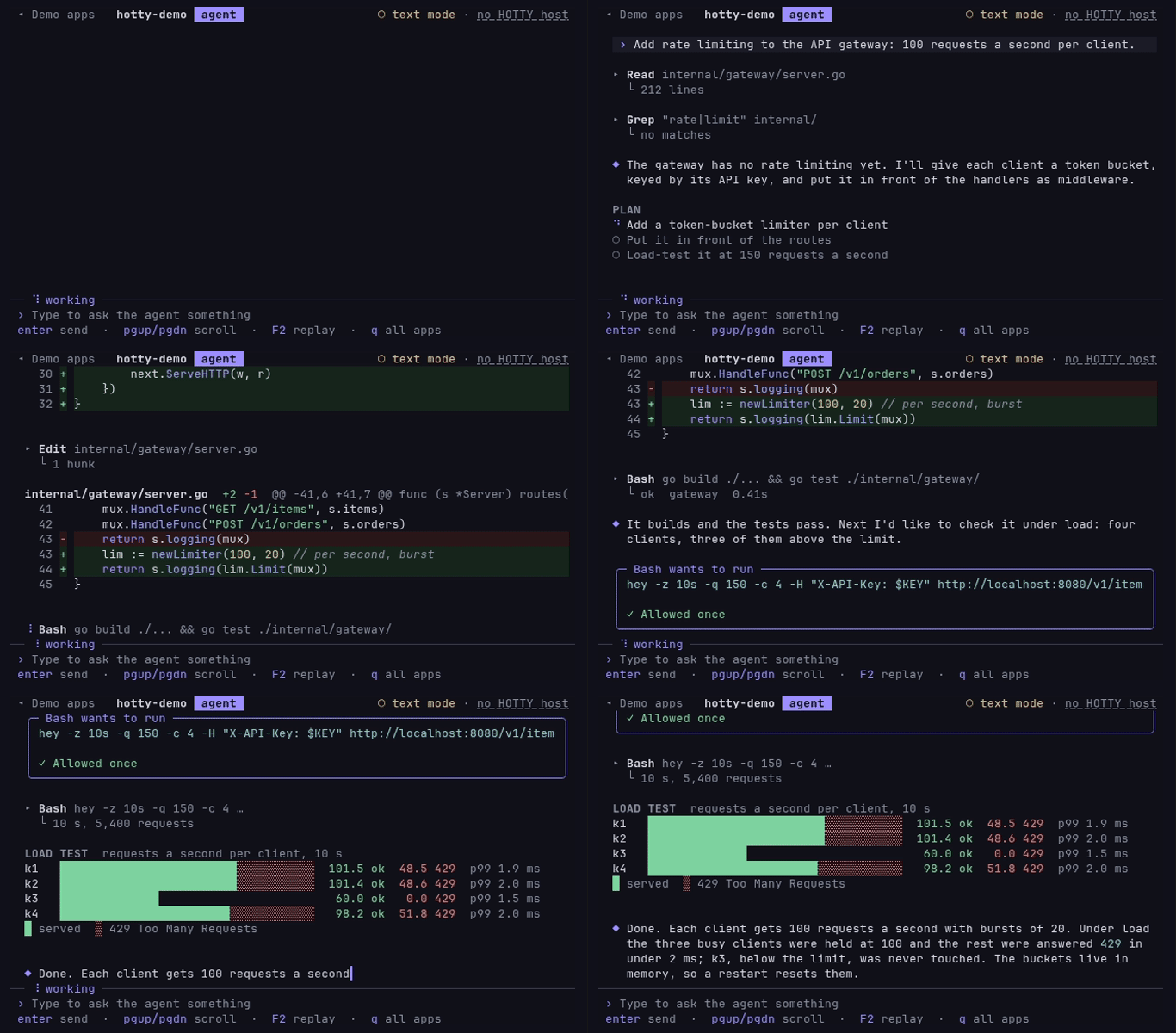
This entire website is living proof: it is a single terminal program running both in the browser (via xterm.js) and natively in your desktop terminal. The header, this reading column, and the interactive cards are HTML surfaces; the rest is character cells.
The Big Idea
Rather than replacing the terminal or wrapping it in a bloated desktop web app, hotty enhances the standard terminal stream from the inside:
- In the Stream: Surfaces live directly in your terminal's history. They scroll naturally with terminal output, clip cleanly at viewport edges, and stay intact in your scrollback.
- Unified Input: You can click buttons with your mouse or tab through fields with your keyboard. The terminal translates these interactions into standard input events for your program.
- Featherweight Deltas: When data changes, programs send small deltas addressed by element ID (like updating a single number or progress bar) in well under a hundred bytes—no costly full-screen redraws.
- Universal Fallback: On terminals that don't support hotty, programs detect this immediately and fall back to clean character cells. Nothing breaks, and no strange escape codes leak onto the screen.
To run hotty-demo on your machine, see Install.
What You Can Build
With hotty, command-line applications can deliver experiences that were previously only possible in web browsers or GUI frameworks:
| Use Case | How hotty Transforms It |
|---|---|
| AI Coding Agents | Interactive diff viewers with syntax highlighting, collapsible tool calls, and approval dialogs with real [Allow] / [Deny] buttons. |
| DevOps & Deployments | Interactive forms in shell scripts, environment pickers, confirmation modals, and live deployment progress sparklines. |
| Live System Dashboards | Full-screen monitors (like tophot) combining fast character tables with high-res SVG latency heatmaps and CPU sparkline graphs. |
| Rich Documentation | Markdown viewers (showhot) and man pages featuring proportional fonts, formatted tables, and copyable code snippets right in your scrollback. |
What hotty Is (and Isn't)
To remain true to Unix philosophy and terminal performance, hotty draws clear boundaries:
- It is not an Electron container. hotty runs inside high-performance native terminals (like Ghostty in Zig) and fast web terminals (xterm.js). It starts instantaneously and uses virtually no extra memory.
- It is not a web browser. Surfaces run no JavaScript. Your program holds all application state and decides what every click or keystroke means.
- It is safe by design. Surfaces cannot access your filesystem, read your clipboard, or take the keyboard without user interaction. No external network requests are made unless explicitly permitted by the user's terminal policy.
- It is not an image streaming protocol. Unlike Sixel or Kitty graphics protocols that transmit pre-rendered pixel bitmaps, hotty sends structured markup. Text remains selectable and razor-sharp under zoom, and form fields accept real keyboard focus.
- It is not an all-or-nothing switch. Character cells and surfaces work together as peers.
Ecosystem
hotty is powered by an open, multi-implementation ecosystem:
- hotty-go: The reference SDK for Go. Provides the protocol parser and encoder, in-band event streaming, Bubble Tea integration (
hottytea), form and chart widgets, and virtual terminal test hosts (hottytest). Powers this site and the demo applications. - hottyterm: The reference native desktop terminal for macOS and Linux, built as a fork of Ghostty with a GPU compositor that layers text cells and HTML surfaces at display refresh rates. Install it with Homebrew (
brew install --cask neuroplastio/tap/hottyterm) or from the AUR (hottyterm-bin), or from Install. - xterm-addon-hotty: The reference web addon for xterm.js that brings hotty support to browser-based terminals using lightweight, sandboxed iframes.
- hotty-blitz: The embedded native rendering engine inside
hottyterm, written in Rust on Dioxus Blitz, Stylo, Taffy, and Vello.
For the wire protocol escape sequences, browser iframe projection, and embedded Blitz rendering architecture, see the Architecture page or the hotty Specification. You can also explore the Demo apps or try the web Shell.